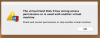
After updating to the latest Parallels Desktop for Mac interim release [12.1.3 (41532)], I get the following message when booting:
"The virtual Hard Disk 0 has wrong access permissions or is used with another virtual machine. Check and correct permissions
or stop another virtual machine."
I then get "Unable to connect to Hard Disk 0" message, and "No boot device available."
I don't have another virtual machine. I've had no problem with this virtual machine until the update.
Help!!
< Scott Baker >
"The virtual Hard Disk 0 has wrong access permissions or is used with another virtual machine. Check and correct permissions
or stop another virtual machine."
I then get "Unable to connect to Hard Disk 0" message, and "No boot device available."
I don't have another virtual machine. I've had no problem with this virtual machine until the update.
Help!!
< Scott Baker >