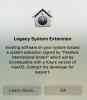
G GillesB Bit poster Jun 28, 2021 #1 Saw this alert today after restarting my Mac Attachments Screen Shot 2021-06-28 at 15.08.40.png 139.4 KB · Views: 6
Maria@Parallels Problem solver Jul 2, 2021 #4 GillesB said: Parallels 16.5 macOS 11.4 Click to expand... Did you try to restart your Mac and reinstall Parallels Desktop? Did you get only this notification?
GillesB said: Parallels 16.5 macOS 11.4 Click to expand... Did you try to restart your Mac and reinstall Parallels Desktop? Did you get only this notification?
G GillesB Bit poster Jul 2, 2021 #5 I restarted the computer, relaunched Parallels and updated WIndows the alert did not show note: this has happened before in a previous MacOs version Seems to be fixed, or it only shows once after an update of MacOS
I restarted the computer, relaunched Parallels and updated WIndows the alert did not show note: this has happened before in a previous MacOs version Seems to be fixed, or it only shows once after an update of MacOS