
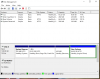
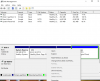
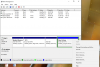
My Window 10 virtual machine continually gets an error trying to download updates due to space limitations. I increased the amount of space allocated to 128GB using the Control Center as described on the Parallels website but when I look in Disk Management on the Virtual Machine, it just created a second 64GB partition instead of increasing the original 64GB. In the instructions, it says right click to just select "Extend Volume" but that option is grey'd out. I can't do anything with the second partition so should I just delete it and start over? I don't want to effect my current virtual machine.
Any info is appreciated.
Any info is appreciated.