
Install the app
How to install the app on iOS
Follow along with the video below to see how to install our site as a web app on your home screen.
Note: This feature may not be available in some browsers.
You are using an out of date browser. It may not display this or other websites correctly.
You should upgrade or use an alternative browser.
You should upgrade or use an alternative browser.
Alter capture default location
- Thread starter even1
- Start date
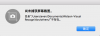


Hi @even1, we've released a new update for Parallels Toolbox 1.7.0 (1026). Added support for custom screenshot storing locations (if changed via Terminal). Please keep us posted the results.I altered location of capture in previous version of toolbox, not at ~/Desktop, now the folder is not exit, i want to alter the location to ~/Desktop, how i can do this?
View attachment 12577
thank you, after runHi @even1, we've released a new update for Parallels Toolbox 1.7.0 (1026). Added support for custom screenshot storing locations (if changed via Terminal). Please keep us posted the results.
defaults read com.apple.screencapture location
the output is: /Users/even/Documents/Watson-Visual Recognition/others/
how i could change default location?
thank you, after runHello,
can you run this command in Terminal
and post it's output here?Code:defaults read com.apple.screencapture location
defaults read com.apple.screencapture location
the output is: /Users/even/Documents/Watson-Visual Recognition/others/
how i could change default location? thanks
It works, thank you!Hello,
If you're using 2.0 version of Parallels Toolbox then open Parallels Toolbox menu (open Parallels Toolbox window --> click on 'gear' button in the title) and choose 'Preferences...'. You can choose default location for screenshot tools in 'Location' tab.
It works, thank you!
You're welcome. Keep us posted. Thanks!