sookainian
Bit poster
Ok i need some expert help.
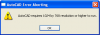
Always when i lunch AutoCAD 2008 in Coherence mode, i'll get this error box.
"AutoCAD requires 1024 by 768 resolution or higher to run"
Then after i click "OK", then it'll lunch AutoCAD.
How do i remove that popup error every time i lunch Auto CAD ??
It gets very irritating.... as I run AutoCAD very often in school and at home while doing my homework.
Coherence & Single Window got error
Full Screen mode no error
Always when i lunch AutoCAD 2008 in Coherence mode, i'll get this error box.
"AutoCAD requires 1024 by 768 resolution or higher to run"
Then after i click "OK", then it'll lunch AutoCAD.
How do i remove that popup error every time i lunch Auto CAD ??
It gets very irritating.... as I run AutoCAD very often in school and at home while doing my homework.
Coherence & Single Window got error
Full Screen mode no error