
Install the app
How to install the app on iOS
Follow along with the video below to see how to install our site as a web app on your home screen.
Note: This feature may not be available in some browsers.
You are using an out of date browser. It may not display this or other websites correctly.
You should upgrade or use an alternative browser.
You should upgrade or use an alternative browser.
BackTrack on Parallels tutorial?
- Thread starter bcamp1973
- Start date
Dishing Tech
Junior Member
How to Install BackTrack with Parallels Desktop
I created a BackTrack 5 VM Image of my own that you can download, so you do not have to download and install via Parallels, very easy to add to your list of virtual machines.
Download it Here
It is the 64-bit Gnome version. It has a few extra features to help beginners get familiar with Linux based terminal commands.
It also has the following installed that the original download does not have:
• Parallels VM Image (tested on Mac, not sure about Windows, let me know!)
• Parallels Tools installed
• Everything accessible on the desktop
• Custom built for WEP aircrack-ng penetration testing using Realtek RTL8187L interface (other cards should work too)
• Easy to use scripts with helpful prompts, minimal typing required to test WEP networks
• Installed Synaptic Package Manager (keep your system up to date, install packages without terminal)
• Latest Kismet 2011-03-2 (will require modification of the kismet.conf file for your card) [optional]
• Link to kismet.conf file on desktop
• Helpful document to recover WEP key networks manually (simple copy and paste into terminal)
• Macchanger GUI App (able to change your MAC Address)
How to Install BackTrack 5 ISO?
I will also create an indepth tutorial on how to install BackTrack on Parallels, but basically you need to select:
• Other Linux Kernel 2.6
• Search for the BackTrack ISO
• If it hangs, push enter
• Click the first option in the menu
• This will allow you to boot into a Live CD
• Then install by clicking the desktop icon
• At reboot type at the root command:
root
password: toor;
and to get to your desktop type: startx
I created a BackTrack 5 VM Image of my own that you can download, so you do not have to download and install via Parallels, very easy to add to your list of virtual machines.
Download it Here
It is the 64-bit Gnome version. It has a few extra features to help beginners get familiar with Linux based terminal commands.
It also has the following installed that the original download does not have:
• Parallels VM Image (tested on Mac, not sure about Windows, let me know!)
• Parallels Tools installed
• Everything accessible on the desktop
• Custom built for WEP aircrack-ng penetration testing using Realtek RTL8187L interface (other cards should work too)
• Easy to use scripts with helpful prompts, minimal typing required to test WEP networks
• Installed Synaptic Package Manager (keep your system up to date, install packages without terminal)
• Latest Kismet 2011-03-2 (will require modification of the kismet.conf file for your card) [optional]
• Link to kismet.conf file on desktop
• Helpful document to recover WEP key networks manually (simple copy and paste into terminal)
• Macchanger GUI App (able to change your MAC Address)
How to Install BackTrack 5 ISO?
I will also create an indepth tutorial on how to install BackTrack on Parallels, but basically you need to select:
• Other Linux Kernel 2.6
• Search for the BackTrack ISO
• If it hangs, push enter
• Click the first option in the menu
• This will allow you to boot into a Live CD
• Then install by clicking the desktop icon
• At reboot type at the root command:
root
password: toor;
and to get to your desktop type: startx
Last edited:
Dishing Tech
Junior Member
I think I have helped enough
Negative, my internet is crappy slow and I have a cap.
links on Megaupload is possible ? FileServ is Crappy Long ...
Negative, my internet is crappy slow and I have a cap.
Dishing Tech
Junior Member
BackTrack 5 R2 Parallels Virtual Machine Image Download
I created a BackTrack 5 R2 Image that can be imported into Parallels. No need to install it through the BackTrack ISO. Much more advanced than the original ISO on the backtrack-linux.org website Downloads and a How to is here.
Screenshot:
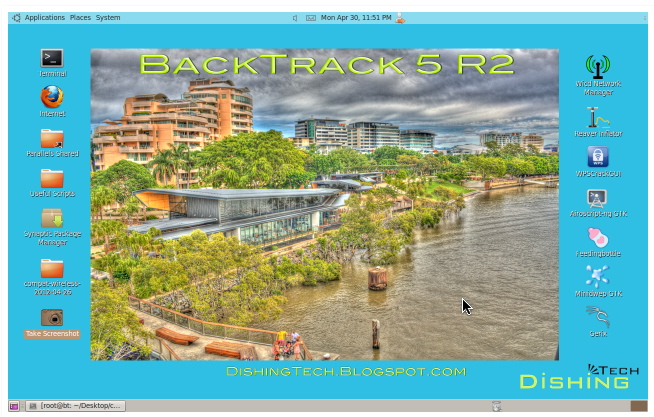
I created a BackTrack 5 R2 Image that can be imported into Parallels. No need to install it through the BackTrack ISO. Much more advanced than the original ISO on the backtrack-linux.org website Downloads and a How to is here.
Screenshot:
Last edited:
ShadowFoxx
Bit poster
For your R2 upgradable to R3 do you have a hash value to verify integrity? (i.e. no malware)