I am using a standard Apple wireless keyboard together with a Belkin Wireless YourType Numeric Keypad. Both work fine under OS X El Capitan but in, for example, Excel under Windows any entry in the Belkin results in focus jumping about the spreadsheet or jumping windows. I assume therefore that a 'signal' is being received but that it has little similarity with the key pressed!
Any suggestions for getting the numeric pad to function correctly?
Hi,
Please follow the below steps to fix this issue.
1. Follow this article and reinstall Parallels Tools.
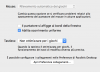
2. Choose Virtual Machine > Configure >Hardware and select Mouse & Keyboard in the sidebar and choose Optimize for games or Auto detect for games.
Thank you for support @Sylvester@Parallels I've followed your directions but the input is really slow. When I type a number the number appear after few seconds...