Beta4 "full screen" - as designed or is this a temporary hack?

Olivier

Forum Maven
Running beta4 on a MBP 10.4.6. The XP-SP2 VM was configured for 1024x768. Upon entering full screen, I would expect XP-SP2 to switch to the native resolution of the host. Instead, what I get is a full-screen (somehow zoomed) display of the 1024x768 resolution. Not fun at all and a huge loss of screen real-estate. ;-)

Is this as-designed for the final release?
Is this a temporary hack?
Are there some settings I should change to get the VM use the fullscreen native resolution of the host? (which is what I would expect and would like to be able to do in the end). That is: no less than what the old bulky and slow Virtual PC did.
 
another thing .. when in "full screen" and you shut down windows the apps running on the Mac change position and their windows are resized .. so you need to exit "full screen" first before shutting down
 
There are 3 possible modes for fullscreen feature:

1. Use current guest resolution in fullscreen mode. Currently implemented.
2. Use current primary resolution in fullscreen mode and change guest resolution when switching into fullscreen. This mode is in roadmap and need some guest OS drivers for work (and it will be possible only for chosen set of guest OSes).
3. Use current primary resolution in fullscreen, but don't change guest resolution. In this case all unused space on screen will be black. This mode is under considearation.

PS: Even in point 1 you able to change desired resolution manually after switching into fullscreen mode.
 
Last edited:
You can change the resolution in the guest currently but Windows is not showing support for the native resolution of a MacBook Pro so it looks pretty bad when it stretches it.
 
spullara said:
You can change the resolution in the guest currently but Windows is not showing support for the native resolution of a MacBook Pro so it looks pretty bad when it stretches it.
Yes - we are already working on this. And native Mac resolutions will be avalable before official release.
 
Fullscreen on 20" secondary display

Hello,

I'd really appreciate it if you could bake in support for the Apple 20" Cinema Display's native resolution as well. Is that planned?

Thanks!
 
I came here looking for specifically this topic. I basically want to launch the guest os into the same resolution I am running on the host. In my case it is a MBP. If the guest os would just support the native resolution of the MBP screen I would be all set. Automatic changing of resolutions through guest drivers would be nice but not essential to me. I am looking forward to it though.
 
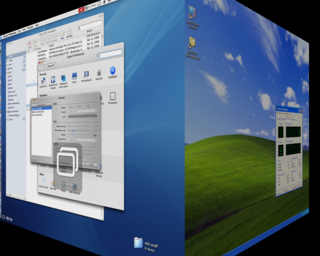
Here's a tip for using fullscreen mode: combined with Virtue Desktops, an open-source virtual desktop manager, you can easily keep Windows in fullscreen mode, and "flip over" to other Mac screens. This allows you to do a quick task like checking email on the Mac side of things without going through the exit-fullscreen, enter-fullscreen dance in Parallels.

Also, using the cube transition to flip between Mac and Windows desktops is just fun :)
Here's a screenshot mid-switch:
parallels.png
 
Last edited:
Expose works great

When you have Parallels working full-screen you can also bring up Expose to rapidly switch to a OS X application. It might just be an accident that it works, but it's a *great* feature that I'd love to see retained in the final release.
 
Back
Top