black boxes in coherence mode PD8

MAG_MIKE

Bit poster
upgraded to parallels desktop 8.. tried to set windows 7 background to solid white, still having same problem . also windows drag really slow in coherence mode (when i can see them).

Oh, also i had my second monitor plugged in, which seems to make the problem happen more frequently; it's the old apple 30" cinema display, but note that the black boxes happen on both screens (mac pro 15" retina and cinema display).
 

Attachments
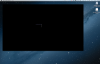
  • Screen Shot 2012-09-04 at 11.26.04 AM.png
    Screen Shot 2012-09-04 at 11.26.04 AM.png
    262.8 KB · Views: 12
Last edited:
Try assigning 512Mb of video memory to your VM in Configuration > Hardware > Video.
 
Happening to me too

This is happening to me too. New PowerBook with Mountain Lion and 16 GB RAM, Parallels 8, external monitor (30" Cinema Display), Windows 8 VM, 2GB RAM in VM, plus 512MB display RAM for VM. It's intermittent. Microsoft Word (on Windows 8) went black in coherence mode. Turning off Coherence made the problem go away, but when I went back to Coherence, it's black again.

I tried following workaround 1 in http://kb.parallels.com/en/112373 but when I switched to Full Screen mode, both my displays went completely black. Turned off fullscreen mode and the display returned to normal.

Other things that did not solve the problem:

- Disabling 3D acceleration. Performance was so horrible when you resized a window (terrible jitters) that I couldn't work this way.
- Changing from DirectX 10 (Experimental) to DirectX 9. Still had intermittent black windows or glitches.

Restarting Microsoft Word in the VM made the problem go away. At least for now.
 
Back
Top