I lost power to my house and my computer must have tried restarting. All this happened when I wasn't home.
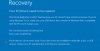
Attempting to start my virtual windows PC via Parallel's when I got home resulted in the attached message.
Scouring the website for a fix I created a Windows 10 installation DVD and change the boot sequence to boot from the DVD first in order to perform a system repair. Unfortunately upon starting the virtual windows pc I get the same message over and over and I don't hear my DVD drive kicking in (spinning) ever.
Also the message that this application (64bit) couldn't load because I don't have a 64 bit processor is clearly not accurate since I have a i7 processor.
I am at a loss of what to try next.
Attempting to start my virtual windows PC via Parallel's when I got home resulted in the attached message.
Scouring the website for a fix I created a Windows 10 installation DVD and change the boot sequence to boot from the DVD first in order to perform a system repair. Unfortunately upon starting the virtual windows pc I get the same message over and over and I don't hear my DVD drive kicking in (spinning) ever.
Also the message that this application (64bit) couldn't load because I don't have a 64 bit processor is clearly not accurate since I have a i7 processor.
I am at a loss of what to try next.