
Install the app
How to install the app on iOS
Follow along with the video below to see how to install our site as a web app on your home screen.
Note: This feature may not be available in some browsers.
You are using an out of date browser. It may not display this or other websites correctly.
You should upgrade or use an alternative browser.
You should upgrade or use an alternative browser.
Bluebeam Revu 2019 hardware rendering disabled
- Thread starter FireClown
- Start date

Maria@Parallels
Problem solver
Hello, could you please share with us your Parallels Desktop and macOS version?I just installed Bluebeam Revu 2019 and was greeted with the cryptic error "Hardware rendering has been disabled due to an issue with the graphics driver." I really have no clue how to start troubleshooting this. Any ideas?
Maria@Parallels
Problem solver
Hello, did you check this article?
@Maria@Parallels
I have called them and they told me it was a parallels issue. There's an issue with parallels using the graphics card. If you go to graphic settings on windows via parallels, you'll get this:
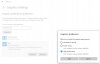
Parallels display adapter is the issue. If I'm on windows via bootcamp, the graphics card that I'm using is the AMD Radeon 5500M. Is there any way to change this?
I have called them and they told me it was a parallels issue. There's an issue with parallels using the graphics card. If you go to graphic settings on windows via parallels, you'll get this:
Parallels display adapter is the issue. If I'm on windows via bootcamp, the graphics card that I'm using is the AMD Radeon 5500M. Is there any way to change this?