> What would be the terminal commands I need to use to install a downloaded .dmg file from your website?
$ hdiutil attach ~/Downloads/ParallelsDesktop-12.2.0-41591.dmg
$ sudo /Volumes/Parallels\ Desktop\ 12/Parallels\ Desktop.app/Contents/MacOS/inittool install -t /Applications/Parallels\ Desktop.app
It would be great if you try them and post their output here.
MacBook-Air-2:~ midijeep$ hdiutil attach ~/Downloads/ParallelsDesktop-12.2.0-41591.dmg
expected CRC32 $51D8A8D5
/dev/disk2 GUID_partition_scheme
/dev/disk2s1 Apple_HFS /Volumes/Parallels Desktop 12
MacBook-Air-2:~ midijeep$ sudo /Volumes/Parallels\ Desktop\ 12/Parallels\ Desktop.app/Contents/MacOS/inittool install -t /Applications/Parallels\ Desktop.app
Password:
Jun 27 17:04:01 pdfm-bootstrap[6384] <Info>: inittool[6366]: Disk space check: source size: 455624 Kb (683436 Kb will require)
Jun 27 17:04:01 pdfm-bootstrap[6390] <Info>: inittool[6366]: Disk space check: 105593536 Kb is available
Jun 27 17:04:01 pdfm-bootstrap[6392] <Info>: inittool[6366]: info Starting Parallels Desktop installation
Jun 27 17:04:01 pdfm-bootstrap[6398] <Info>: inittool[6366]: info Bundle '/Volumes/Parallels Desktop 12/Parallels Desktop.app', version '12.2.0-41591'
Jun 27 17:04:01 pdfm-bootstrap[6399] <Info>: inittool[6366]: Found launcher script '/Applications/Parallels Desktop.app/Contents/MacOS/launcher'. Stopping services from previous installation...
/bin/bash: /Applications/Parallels Desktop.app/Contents/MacOS/launcher: Permission denied
/bin/bash: /Applications/Parallels Desktop.app/Contents/MacOS/launcher: Permission denied
Jun 27 17:04:01 pdfm-bootstrap[6418] <Notice>: launcher[6412]: Is executed with params 'stop'
Jun 27 17:04:01 pdfm-bootstrap[6428] <Info>: agent[6419]: prl_event_tap () not alive
Jun 27 17:04:01 pdfm-bootstrap[6429] <Info>: agent[6419]: prl_naptd () not alive
dyld: warning, LC_RPATH @loader_path/../Frameworks in /Applications/Parallels Desktop.app/Contents/MacOS//Parallels Service being ignored in restricted program because of @loader_path
dyld: warning, LC_RPATH @loader_path/../Frameworks in /Applications/Parallels Desktop.app/Contents/MacOS//Parallels Service being ignored in restricted program because of @loader_path
dyld: warning, LC_RPATH @loader_path/../Frameworks in /Applications/Parallels Desktop.app/Contents/MacOS//Parallels Service being ignored in restricted program because of @loader_path
dyld: warning, LC_RPATH @loader_path/../Frameworks in /Applications/Parallels Desktop.app/Contents/MacOS//Parallels Service being ignored in restricted program because of @loader_path
dyld: warning, LC_RPATH @loader_path/../Frameworks in /Applications/Parallels Desktop.app/Contents/MacOS//Parallels Service being ignored in restricted program because of @loader_path
dyld: warning, LC_RPATH @loader_path/../Frameworks in /Applications/Parallels Desktop.app/Contents/MacOS//Parallels Service being ignored in restricted program because of @loader_path
dyld: warning, LC_RPATH @loader_path/../Frameworks in /Applications/Parallels Desktop.app/Contents/MacOS//Parallels Service being ignored in restricted program because of @loader_path
dyld: warning, LC_RPATH @loader_path/../Frameworks in /Applications/Parallels Desktop.app/Contents/MacOS//Parallels Service being ignored in restricted program because of @loader_path
dyld: warning, LC_RPATH @loader_path/../Frameworks in /Applications/Parallels Desktop.app/Contents/MacOS//Parallels Service being ignored in restricted program because of @loader_path
dyld: warning, LC_RPATH @loader_path/../Frameworks in /Applications/Parallels Desktop.app/Contents/MacOS//Parallels Service being ignored in restricted program because of @loader_path
dyld: warning, LC_RPATH @loader_path/../Frameworks in /Applications/Parallels Desktop.app/Contents/MacOS//Parallels Service being ignored in restricted program because of @loader_path
dyld: warning, LC_RPATH @loader_path/../Frameworks in /Applications/Parallels Desktop.app/Contents/MacOS//Parallels Service being ignored in restricted program because of @loader_path
dyld: warning, LC_RPATH @loader_path/../Frameworks in /Applications/Parallels Desktop.app/Contents/MacOS//Parallels Service being ignored in restricted program because of @loader_path
dyld: warning, LC_RPATH @loader_path/../Frameworks in /Applications/Parallels Desktop.app/Contents/MacOS//Parallels Service being ignored in restricted program because of @loader_path
dyld: warning, LC_RPATH @loader_path/../Frameworks in /Applications/Parallels Desktop.app/Contents/MacOS//Parallels Service being ignored in restricted program because of @loader_path
dyld: warning, LC_RPATH @loader_path/../Frameworks in /Applications/Parallels Desktop.app/Contents/MacOS//Parallels Service being ignored in restricted program because of @loader_path
dyld: warning, LC_RPATH @loader_path/../Frameworks in /Applications/Parallels Desktop.app/Contents/MacOS//Parallels Service being ignored in restricted program because of @loader_path
dyld: warning, LC_RPATH @loader_path/../Frameworks in /Applications/Parallels Desktop.app/Contents/MacOS//Parallels Service being ignored in restricted program because of @loader_path
Jun 27 17:04:02 pdfm-bootstrap[6514] <Notice>: launcher[6412]: Stop finished. Agents: 1; Service: 0; LaunchdSetup: 0
Jun 27 17:04:02 pdfm-bootstrap[6516] <Info>: inittool[6366]: Remove symlinks to kexts
INIT_STATE: STATE_COPY
INIT_PROGRESS: -1
Jun 27 17:04:07 pdfm-bootstrap[6520] <Info>: inittool[6366]: Copying product into '/Applications/Parallels Desktop.app'
LSOpenURLsWithRole() failed with error -10810 for the file /Applications/Parallels Desktop.app/Contents/Applications/Parallels Link.app.
Jun 27 17:05:04 pdfm-bootstrap[6575] <Error>: inittool[6546]: '/Applications/Parallels Desktop.app/Contents/MacOS/Parallels Service' - incorrect permissions (0744)
Jun 27 17:05:04 pdfm-bootstrap[6577] <Info>: inittool[6546]: Bundle '/Applications/Parallels Desktop.app' (12.2.0-41591) is not initialized: let's cook it
Jun 27 17:05:04 pdfm-bootstrap[6578] <Info>: inittool[6546]: Set bundle owners to 'root:wheel'
Jun 27 17:05:04 pdfm-bootstrap[6589] <Info>: inittool[6546]: Bootstrap actions
Jun 27 17:05:04 pdfm-bootstrap[6592] <Info>: inittool[6546]: Check for previous version and uninstall if need
Jun 27 17:05:04 pdfm-bootstrap[6595] <Info>: inittool[6546]: Starting uninstallation procedure of
INIT_STATE: STATE_UNINSTALL
INIT_PROGRESS: 0
Jun 27 17:05:04 pdfm-bootstrap[6596] <Info>: inittool[6546]: Backup Parallels Desktop [/Applications/Parallels Desktop.app > /var/folders/zz/zyxvpxvq6csfxvn_n0000000000000/T/parallels-desktop.B2gXu61v/Parallels Desktop.app]
INIT_PROGRESS: 10
Jun 27 17:05:04 pdfm-bootstrap[6599] <Info>: inittool[6546]: Running uninstaller
INIT_PROGRESS: 35
Jun 27 17:05:06 pdfm-bootstrap[6645] <Info>: inittool[6546]: Restore Parallels Desktop [/var/folders/zz/zyxvpxvq6csfxvn_n0000000000000/T/parallels-desktop.B2gXu61v/Parallels Desktop.app > /Applications/Parallels Desktop.app]
INIT_PROGRESS: 45
Jun 27 17:05:06 pdfm-bootstrap[6649] <Info>: inittool[6546]: End of uninstallation procedure
INIT_PROGRESS: 50
Jun 27 17:05:06 pdfm-bootstrap[6650] <Info>: inittool[6546]: Check and remove broken previous version...
INIT_STATE: STATE_INIT
INIT_PROGRESS: 50
Jun 27 17:05:06 pdfm-bootstrap[6665] <Info>: inittool[6546]: Starting bootstrap action 'install_safari_extensions' in background
Jun 27 17:05:06 pdfm-bootstrap[6667] <Info>: inittool[6546]: Starting bootstrap action 'fix_sharedapp_bundle' in background
Jun 27 17:05:06 pdfm-bootstrap[6668] <Info>: inittool[6546]: Installing Safari extensions...
Jun 27 17:05:06 pdfm-bootstrap[6671] <Info>: inittool[6546]: Starting bootstrap action 'reg_bundles' in background
Jun 27 17:05:06 pdfm-bootstrap[6682] <Info>: inittool[6546]: Starting bootstrap action 'prlapps_folder_icon' in background
Jun 27 17:05:06 pdfm-bootstrap[6689] <Info>: inittool[6546]: Starting bootstrap action 'copy_learn_videos'
Jun 27 17:05:06 pdfm-bootstrap[6699] <Info>: inittool[6546]: Endinging bootstrap action 'copy_learn_videos' with exit code '0'
INIT_PROGRESS: 58
Jun 27 17:05:06 pdfm-bootstrap[6702] <Info>: inittool[6546]: Starting bootstrap action 'fix_library_parallels_dir_perms'
Jun 27 17:05:06 pdfm-bootstrap[6705] <Info>: inittool[6546]: Installing Safari extensions for Bj...
Jun 27 17:05:06 pdfm-bootstrap[6706] <Info>: inittool[6546]: Fixing Library/Parallels permissions...
bash: /Applications/Parallels Desktop.app/Contents/MacOS/add_safari_ext: Permission denied
Jun 27 17:05:06 pdfm-bootstrap[6727] <Info>: inittool[6546]: Installing Safari extensions for midijeep...
Jun 27 17:05:07 pdfm-bootstrap[6732] <Info>: inittool[6546]: * Bj OK
Jun 27 17:05:07 pdfm-bootstrap[6737] <Info>: inittool[6546]: * midijeep OK
bash: /Applications/Parallels Desktop.app/Contents/MacOS/add_safari_ext: Permission denied
Jun 27 17:05:07 pdfm-bootstrap[6745] <Info>: inittool[6546]: * midijeep OK
Jun 27 17:05:07 pdfm-bootstrap[6746] <Info>: inittool[6546]: Endinging bootstrap action 'fix_library_parallels_dir_perms' with exit code '0'
INIT_PROGRESS: 66
Jun 27 17:05:07 pdfm-bootstrap[6747] <Info>: inittool[6546]: Waiting background job 'install_safari_extensions' with pid 6666...
Jun 27 17:05:07 pdfm-bootstrap[6749] <Error>: inittool[6546]: Background job 'install_safari_extensions' finished with exit code '126'
Jun 27 17:05:07 pdfm-bootstrap[6750] <Info>: inittool[6546]: Waiting background job 'fix_sharedapp_bundle' with pid 6669...
Jun 27 17:05:08 pdfm-bootstrap[6760] <Info>: inittool[6546]: 'fix_sharedapp_bundle' finished successfuly
INIT_PROGRESS: 74
Jun 27 17:05:08 pdfm-bootstrap[6761] <Info>: inittool[6546]: Waiting background job 'reg_bundles' with pid 6681...
Jun 27 17:05:08 pdfm-bootstrap[6762] <Info>: inittool[6546]: 'reg_bundles' finished successfuly
INIT_PROGRESS: 82
Jun 27 17:05:08 pdfm-bootstrap[6763] <Info>: inittool[6546]: Waiting background job 'prlapps_folder_icon' with pid 6688...
Jun 27 17:05:08 pdfm-bootstrap[6764] <Info>: inittool[6546]: 'prlapps_folder_icon' finished successfuly
INIT_PROGRESS: 90
Jun 27 17:05:08 pdfm-bootstrap[6765] <Info>: inittool[6546]: Remove temporary directory (/tmp/parallels-desktop-init-6546.tmp)
MacBook-Air-2:~ midijeep$
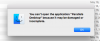
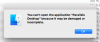
When I look at the Parallels application placed in the applications folder the size shows "Zero bytes". When I try to launch the app I get the same error message as before.