I have put Parallels 6 on a MacBook Pro (Snow Leopard OS X 10.6.5; 2.66 GHz Intel Core 2 Duo; 4 GB MHz DDR3 RAM). Windows 7 Home Premium is the Windows OS.
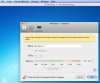
I am not able to change the RAM allotted to the VM from the default 1 GB (I would like to increase it). When I open the RAM setting control (via Parallels Desktop > Virtual Machine > Configure > General) the slider for adjustment (see screen shot below) cannot be moved.
Does anyone know how the slider may be enabled, so I can change the allotted RAM setting? Thanks much in advance for any advice, suggestions, comments, etc.
I am not able to change the RAM allotted to the VM from the default 1 GB (I would like to increase it). When I open the RAM setting control (via Parallels Desktop > Virtual Machine > Configure > General) the slider for adjustment (see screen shot below) cannot be moved.
Does anyone know how the slider may be enabled, so I can change the allotted RAM setting? Thanks much in advance for any advice, suggestions, comments, etc.