
I get this dialog:

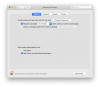
But in my System Preferences -> Privacy and Security, there is no "Allow" button:
I can't use Parallels until this extension is loaded, which has stopped me from debugging a Windows issue (not good timing for working from home). Any alternative way to load the kext? I'm on macOS Catalina 10.15.4 and Parallels is the latest version as of this post [15.1.3 (47255)]
But in my System Preferences -> Privacy and Security, there is no "Allow" button:
I can't use Parallels until this extension is loaded, which has stopped me from debugging a Windows issue (not good timing for working from home). Any alternative way to load the kext? I'm on macOS Catalina 10.15.4 and Parallels is the latest version as of this post [15.1.3 (47255)]

