Cannot find JDK install directory

KarnM

Bit poster
Hi:

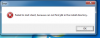
I have a problem of cannot install program because it showed "fail to start client, no JDK install directory" as attached image

How can i solve this?

My friend can install without problem anything but he use the windows laptop.
 

Attachments

  • Screen Shot 2559-06-05 at 1.16.10 PM.png
    Screen Shot 2559-06-05 at 1.16.10 PM.png
    43.9 KB · Views: 3
Hello KarnM,
Try to install JDK software manually by following the steps below:
-> Click on this link to download JDK.
-> Select the appropriate JDK software and click Download.
-> The JDK software is installed on your computer, for example, at C:\Program Files\Java\jdk1.6.0_02.
-> You can move the JDK software to another location if desired.
 
After installed, should I deactivate isolate function?
Hi KarnM, yes, you can disable Isolate function by navigating to Actions> Configure > Security > Uncheck Isolate Windows from Mac.
Let us know how it works.
 
OK. I will to try it and tell you about result.
This problem made me mad for 3-4 days and worried about buy new PC notebook.
 
Back
Top