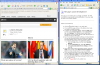
Cannot go into Google or download Chrome...

Aaron7

Bit poster
Hi, I have a problem with the Internet connection in Parallels 12. I am running OSX El Capitan on MBP and Windows XP.

I seem to be able to get the default Bing search engine on Internet Explorer (with news feeds etc), and BBC (very slow and does not fully load) but I cannot get into Google (or many other sites). I cannot download Chrome or Microsoft Office.

Please help.

thanks
 
Hello Aaron7, please open up RUN command and type iexplore, go to tools ->advanced and hit reset (You can also open the Internet settings from Control panel. If Control Panel is in Category View please click on Switch to Classic View button to change it).
Also get to a command prompt and type
ipconfig /flushdns
I am pretty sure that will fix you up. If not schedule your AntiVirus for a scan at boot up.
 
Hello Aaron7, please open up RUN command and type iexplore, go to tools ->advanced and hit reset (You can also open the Internet settings from Control panel. If Control Panel is in Category View please click on Switch to Classic View button to change it).
Also get to a command prompt and type
ipconfig /flushdns
I am pretty sure that will fix you up. If not schedule your AntiVirus for a scan at boot up.

Unfortunately that did not work Paul. Anything else you can suggest?
 
Hello Aaron7, please open up RUN command and type iexplore, go to tools ->advanced and hit reset (You can also open the Internet settings from Control panel. If Control Panel is in Category View please click on Switch to Classic View button to change it).
Also get to a command prompt and type
ipconfig /flushdns
I am pretty sure that will fix you up. If not schedule your AntiVirus for a scan at boot up.
I have also gone into Run and typed: ping parallels.com. This seemed to work:
 

Attachments

  • Screen Shot 2017-01-04 at 10.50.16.png
    Screen Shot 2017-01-04 at 10.50.16.png
    21.2 KB · Views: 8
Back
Top