Mac Pro 2x3 GHz-Dual-Core Intel
Mac OSX 10.6.3
4 GB RAM
Windows XP guest
Parallels Desktop 5 Build 5.0.9344 Rev. 558741
I'm having a problem installing Parallels Tools after several reinstalls of Parallels to diagnose/correct other problems (i.e. not booting, booting with errors, snail-like speed among others).
History: For the longest time I was unable to boot up with much success, and did create a support request with Parallels. After several weeks of going back and forth with no solution, I trashed preferences and was able to boot up again, but everything was painfully slow...was slowing my Mac down (110% CPU usage, etc.) and would take 10-15 minutes to boot.
Current problem(s):
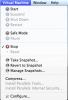
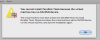
1) I cannot install Parallels Tools. First, I get the message that tools are not installed (screen1), and to go to the virtual machine menu where the tools are either grayed out (screen2), or if I CAN get to the Install Parallels Tools menu, I am told that I cannot install Parallels Tools because the virtual machine has no CD/DVD device (Screen3).
2) Second problem is (and probably tools related) is that I cannot resize the area that Windows takes up. I used to be able to resize the Parallels window, and the Windows-window within would adjust itself accordingly. Now I can resize the Parallels window, but the Windows-window remains at (roughly) a 640x480.
Please let me know if I have omitted any important information and I'll try to clarify. Thanks for any help out there... I'm getting inches away of switching software due to a never-ending string of glitches and problems!
Mac OSX 10.6.3
4 GB RAM
Windows XP guest
Parallels Desktop 5 Build 5.0.9344 Rev. 558741
I'm having a problem installing Parallels Tools after several reinstalls of Parallels to diagnose/correct other problems (i.e. not booting, booting with errors, snail-like speed among others).
History: For the longest time I was unable to boot up with much success, and did create a support request with Parallels. After several weeks of going back and forth with no solution, I trashed preferences and was able to boot up again, but everything was painfully slow...was slowing my Mac down (110% CPU usage, etc.) and would take 10-15 minutes to boot.
Current problem(s):
1) I cannot install Parallels Tools. First, I get the message that tools are not installed (screen1), and to go to the virtual machine menu where the tools are either grayed out (screen2), or if I CAN get to the Install Parallels Tools menu, I am told that I cannot install Parallels Tools because the virtual machine has no CD/DVD device (Screen3).
2) Second problem is (and probably tools related) is that I cannot resize the area that Windows takes up. I used to be able to resize the Parallels window, and the Windows-window within would adjust itself accordingly. Now I can resize the Parallels window, but the Windows-window remains at (roughly) a 640x480.
Please let me know if I have omitted any important information and I'll try to clarify. Thanks for any help out there... I'm getting inches away of switching software due to a never-ending string of glitches and problems!