Cannot stop Apple menu bar from dropping down at the top of Parallels desktop...

MarkL12

Junior Member
I'm using (or trying to) OS X Sierra with Parallels 12.1.3. I cannot stop the Apple menu bar from dropping down when I move the cursor near the top of the Parallels desktop and it is annoying in the extreme. I've tried all of the suggestions that I managed to unearth in this forum and NOTHING works!

Is there any way to stop it or is this a new "feature" the programmers have blessed me with?
 
I'm using (or trying to) OS X Sierra with Parallels 12.1.3. I cannot stop the Apple menu bar from dropping down when I move the cursor near the top of the Parallels desktop and it is annoying in the extreme. I've tried all of the suggestions that I managed to unearth in this forum and NOTHING works!

Is there any way to stop it or is this a new "feature" the programmers have blessed me with?
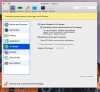
Hi @MarkL12, please shut down your virtual machine and go to virtual machine configuration-> Options->Full screen -> Check "Optimize full screen for games" and let us know how it works.
 
Thanks PaulChris! That worked...FINALLY! I already had the setting checked but closing, checking and unchecking the box referenced above, and restarting Parallels caused it to take this time. Perhaps it was just a "hiccough" in the settings being properly recognized. Thanks again.
 
Thanks PaulChris! That worked...FINALLY! I already had the setting checked but closing, checking and unchecking the box referenced above, and restarting Parallels caused it to take this time. Perhaps it was just a "hiccough" in the settings being properly recognized. Thanks again.
You're welcome. Feel free to reach out anytime. We are here to help!
 
Hi PaulChris! Please reread my post above. The problem IS NOT sorted!
Please be informed that Parallels Desktop 12 Update 12.2 (41591) was released. Please update Parallels Desktop to the latest build. Please note that Parallels Tools also needs to be updated (Actions > Update Parallels Tools) and let us know how it works.
 
Did that and STILL have the same problem. I'm to the point of considering downgrading to a previous version. This should not be as difficult to resolve as it is. Are these things not tested before release?

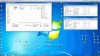
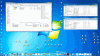
Here are screenshots showing what happens when I mouse up and down in Parallels and a screenshot of my Full Screen settings which should prevent the behaviour I'm witnessing.

Screen-Shot-2017_1.gif Screen-Shot-2017_2.gif Screen Shot 2017_3.png
 
Nope! Still doing it! What an absolute joke. Looks like Parallels 12 is gamma level software being marketed at an alpha price.
 
Back
Top