oceanben@earthlink.net
Bit poster
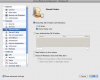
I have a number of drives attached to my OS-X system that I have no need to share with my Windows Virtual machine. Under the "Shared Folder" tab in the Virtual machine configuration utility I have checked the box for "Share Mac OX folders with Windows - Home Folder Only. Everything else is unchecked (see 1st attachment - Picture 11.png)).
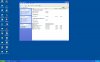
However, when I boot my virtual machine, all my attached drives and partitions show up under MY Computer with their own drive letters (see 2nd attachment - Parallels Picture.png). This causes conflicts with some of my company network drives which need to use those drive letters. How do I get these OS-X volumes to stop "mounting?"
However, when I boot my virtual machine, all my attached drives and partitions show up under MY Computer with their own drive letters (see 2nd attachment - Parallels Picture.png). This causes conflicts with some of my company network drives which need to use those drive letters. How do I get these OS-X volumes to stop "mounting?"