YoungSeok_Yoon
Bit poster
I am using Parallels Desktop for Mac 9 for my Windows 8.1 guest OS.
The guest OS is running in Full-screen mode in an external monitor with a native resolution of 1920x1080.
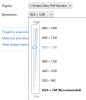
The problem is that after a Windows update I've done today, the "Screen Resolution" config window no longer shows an option for 1920x1080 (16:9).
It only shows 1920x1200 (16:10) and the the next item in the dropdown is 1680x1050.
I reinstalled parallels tools a few times, but it didn't work either.
Is there any known solution for this problem?
The guest OS is running in Full-screen mode in an external monitor with a native resolution of 1920x1080.
The problem is that after a Windows update I've done today, the "Screen Resolution" config window no longer shows an option for 1920x1080 (16:9).
It only shows 1920x1200 (16:10) and the the next item in the dropdown is 1680x1050.
I reinstalled parallels tools a few times, but it didn't work either.
Is there any known solution for this problem?