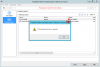
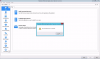
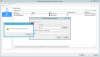
I've followed the "How to deploy Parallels RAS on Microsoft Azure" YouTube tutorial, exactly, I'm quite sure. When I get to the point where I'm told to "reactivate the license and trial key" (3:50), I see something different from what's in the tutorial (see images below).
After I click OK on the "The evaluation time has expired" dialog, I can't find a way to get to the state where ALLINONE is selected as the current Site and where I can access Licensing on the left pane.
Anyone have any idea if I've done something wrong, or how to recover from this state (is the Not Verified status significant)?
Thanks!
Hi, @DavidC27 we've received your reply:
I was never asked to identify myself to Parallels, so how would it know? If you watch the tutorial up to that point you'll see it's generic. Well, my identity is established with Azure but there's no link to Parallels up to that point.
I've gotten the status to "Agent Verified" but still can't select any Agents/Sites (and so can't get to Licensing). When I click the Resolve button in the Edit RAS Publishing Agents dialog, I get the error "Could not resolve IP for the given server." That IP (10.1.1.11) is the local IP for the VM. Windows Firewall is turned off.
Hey @DavidC27
Apologies for being quite late to respond, however there are couple of things to note regarding this thread:
1. All-in-One appliance have trial period which is already expired so the only way to activate it is to request a trial key. It's been a while since we reported this to appropriate department however I'm not sure if it was fixed for now or not. Should you wish to proceed with product evaluation please let me know so we can issue an extended trial key for 30 days so you can proceed with evaluation.
2. Configuration on the screen shot provided looks slightly incorrect since Publishing Agent (PA) component is somewhat like a 'Master' component of installation which serves as brain center of RAS installation. The behavior which is observed on the screenshot is caused by the fact that you have 2 PAs on two different servers and currently you are operating RAS Console from secondary Publishing Agent, but not master.