carlosrodzbotet
Hunter
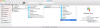
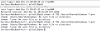
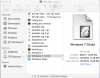
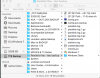
I wanted to upgrade to Parallels 12 so I've been trying to backup my laptop with CCC (Carbon Copy Cloner) and it'll backup everything except "Windows 7.pvm". So I clicked on SHOW PACKAGE CONTENTS and I was able to manually copy everything to my portable drive except for the file "Windows7-0.hdd".
When I tried to manually copy this file, after copying 37.34GB of the 66.42GB file showing 24 minutes to go, it stopped and gave me this message :
the Finder can't complete the operation because some data in the "Windows 7-0.hdd" cant be read or written. (Error Code -36)
Everything in Parallels 11 and everything on the Mac OS side are all working fine but I just can't get Parallels file to copy so I can have a backup.
1st question about this issue:
How can I find out which part of the Windows 7-0.hdd file is bad so I can correct it and backup my files so I can upgrade to 12 and not have to stay on Parallels 11 and keep praying nothing goes bad and I lose all of my data?
2nd question about this issue:
Where is my data? If it's on one of the other files that I can copy then can I just install Parallels 12 and copy those files to my new copy of Parallels?
I have a new laptop that I just downloaded the trial version of Parallels 12 to it. Once that's done I want to buy Parallels 12 but I need to be able to move my old information to it before getting rid of my old laptop.


When I tried to manually copy this file, after copying 37.34GB of the 66.42GB file showing 24 minutes to go, it stopped and gave me this message :
the Finder can't complete the operation because some data in the "Windows 7-0.hdd" cant be read or written. (Error Code -36)
Everything in Parallels 11 and everything on the Mac OS side are all working fine but I just can't get Parallels file to copy so I can have a backup.
1st question about this issue:
How can I find out which part of the Windows 7-0.hdd file is bad so I can correct it and backup my files so I can upgrade to 12 and not have to stay on Parallels 11 and keep praying nothing goes bad and I lose all of my data?
2nd question about this issue:
Where is my data? If it's on one of the other files that I can copy then can I just install Parallels 12 and copy those files to my new copy of Parallels?
I have a new laptop that I just downloaded the trial version of Parallels 12 to it. Once that's done I want to buy Parallels 12 but I need to be able to move my old information to it before getting rid of my old laptop.