can't boot on CD

Samy-dt

Bit poster
Hello,

I'm using parallels desktop on mac os X 10.8.5. I want to replace a windows 7 using a CD/DVD. I'm using an external drive (sony Dual Rw) to do it.

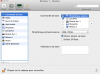
Look the attachment below to see the booting parameters I set. (sorry it's a french version but it's nearly the same words). The DRX-700UL is supposed to be my external sony drive.

When running the windows virtual machine, and typing ESC, I have an error message : "Boot from USB CD/DVD drive failed and my external drive open."

Any help to solve this problem ?

Thanks
 

Attachments

  • Capture d’écran 2014-06-10 à 11.47.47.png
    Capture d’écran 2014-06-10 à 11.47.47.png
    92 KB · Views: 19
Hello Samy-dt,

Please uncheck the "select boot device on start-up" option and select the "CD/DVD" to be the first boot device and select "External device" to be the last boot device.

Let us know if you have any additional questions.
 
Thank you for support.

I finally decided to add a new virtual machine and delete the previous one.

But I have a new problem. My admin name (in windows) need a backslash. But the fact is that I have a Mac keyboard. I tried some stuff like alt + shift + / that works in mac environment but without success in windows. The most surprising thing is that if I do alt + 8 in windows with the mac keyboard, it works only after the login, once I arrive in the desktop...It doesn't work at the login level.

And even if I use the virtual keyboard, there's no backslash !

Any help ?
 
Hello Samy-dt,

Please check the keyboard layouts selected on your Mac and your Windows Virtual Machine.

Follow the navigation below to find the keyboard layout selected on your Mac:

1. In Mac OS X, choose Apple menu > System Preferences and click Language & Text.
2. Click Input Sources.
3. Select the language or languages you want to use from the sidebar.
4. Select Show input menu in menu bar.

Note: The language you're selecting from the Input menu must be also available in Windows.

Please select the same keyboard layout on your Windows Virtual Machine.

Follow the steps as suggested at: http://kb.parallels.com/111674 to select the same keyboard layout on your Windows VM.

Let us know if you have any additional questions.
 
Last edited:
Back
Top