I've got 1.2TB Fusion Drive on Mac mini 2012 under 10.8.2 / 10.8.3 (beta 12D68) - the same problem under both OS versions. I have created Boot Camp partition and successfully set up Windows 7 x64.
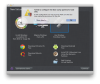
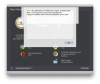
Now i have just downloaded trial PD 8 (Build 8.0.18354 Revision 82316), advertised to be able to use Boot Camp Windows partitions for virtual machines, but i'm unable to create one with the following error:
rror: PRL_ERR_DISK_GPT_MBR_NOT_EQUAL (0x80021065)
Path: '/Users/gt/Documents/Parallels/My Boot Camp.pvm/APPLE HDD HTS541010A9E662 (disk1).hdd'
I'm in the know of Boot Camp unsupported on iMacs with 3TB Fusion Drives because of Windows 7 limitations, but got Mac mini with 1.2TB Fusion Drive and Windows 7 x64 on Boot Camp works flawlessly.
What am i doing is i'm starting PD, choosing "Use Windows from Boot Camp", waiting for PD to unmount BC partition, but it is remounted back after a second with the following error message: "Failed to configure the Boot Camp partition's hard disk. A disk configuration error has occurred. Make sure that you have read/write permissions for the disk.", and with afore mentioned error details under "more details" button pressed.
I can see the following new records appearing in the Console log while this happens:
24.02.13 7:17:52,917 mds[75]: (Error) LSOF: File '/Volumes/BOOTCAMP' (fd=16) left open on device 16777221
24.02.13 7:17:53,573 fseventsd[40]: could not open <</Volumes/BOOTCAMP/.fseventsd/fseventsd-uuid>> (No such file or directory)
24.02.13 7:17:53,574 fseventsd[40]: log dir: /Volumes/BOOTCAMP/.fseventsd getting new uuid: 1F6894CE-1D7F-4B6B-8EF0-61BDE4952DD0
24.02.13 7:17:53,590 mds[75]: (Error) Volume: Root store set to FSOnly with matching create! (loaded:1)
Have no idea, if i'm doing something wrong, but i believe, it fails by some PD bugs.
PS.
I have Paragon NTFS 10.0.1 driver installed and registered. I have also added Boot Camp partition to the Spotlight exclusion list after reading mds console error messages, but still no luck.
Now i have just downloaded trial PD 8 (Build 8.0.18354 Revision 82316), advertised to be able to use Boot Camp Windows partitions for virtual machines, but i'm unable to create one with the following error:
rror: PRL_ERR_DISK_GPT_MBR_NOT_EQUAL (0x80021065)
Path: '/Users/gt/Documents/Parallels/My Boot Camp.pvm/APPLE HDD HTS541010A9E662 (disk1).hdd'
I'm in the know of Boot Camp unsupported on iMacs with 3TB Fusion Drives because of Windows 7 limitations, but got Mac mini with 1.2TB Fusion Drive and Windows 7 x64 on Boot Camp works flawlessly.
What am i doing is i'm starting PD, choosing "Use Windows from Boot Camp", waiting for PD to unmount BC partition, but it is remounted back after a second with the following error message: "Failed to configure the Boot Camp partition's hard disk. A disk configuration error has occurred. Make sure that you have read/write permissions for the disk.", and with afore mentioned error details under "more details" button pressed.
I can see the following new records appearing in the Console log while this happens:
24.02.13 7:17:52,917 mds[75]: (Error) LSOF: File '/Volumes/BOOTCAMP' (fd=16) left open on device 16777221
24.02.13 7:17:53,573 fseventsd[40]: could not open <</Volumes/BOOTCAMP/.fseventsd/fseventsd-uuid>> (No such file or directory)
24.02.13 7:17:53,574 fseventsd[40]: log dir: /Volumes/BOOTCAMP/.fseventsd getting new uuid: 1F6894CE-1D7F-4B6B-8EF0-61BDE4952DD0
24.02.13 7:17:53,590 mds[75]: (Error) Volume: Root store set to FSOnly with matching create! (loaded:1)
Have no idea, if i'm doing something wrong, but i believe, it fails by some PD bugs.
PS.
I have Paragon NTFS 10.0.1 driver installed and registered. I have also added Boot Camp partition to the Spotlight exclusion list after reading mds console error messages, but still no luck.