I've been using Desktop Parallels before, on a different computer (also using OS X) than this one. On the old system, I had a WinXP VM and a Linux one. I don't recall if I ever had both running at the same time, but I never had a problem reaching my LAN or the Internet through either one.
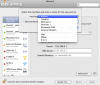
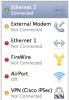
On my new MacMini, using the Server version of OS X, I created a Linux VM from Debian 5.0 and configured everything as I'll need it on several VMs. I set it up for bridged networking because I need to be able to reach it from other computers on my LAN through ssh while I'm working on it. I copied the MAC address from this VM and entered it int PFSense (which provides my DHCP and DNS on the LAN) and it assigned it the address I expected. Everything was working great.
Then I cloned it and started the clone. I ran ifconfig on the clone VM and got the local loopback connection only. I ran "ifconfig -a" and got the MAC address for eth1, since that was the only one specified, and entered that into PFSense for the DHCP and DNS. I tried "/etc/init.d/networking restart", thinking that the VM would restart networking and would send out a DHCP request and get the IP address.
But then I find there is no networking connection. In /etc/network/interfaces, eth0 is set up, but no eth1 is visible. I check the preferences for the VM and the networking interface is disabled. I shut down the system and open preferences and, magically, the ethernet adapter is enabled. I restart the machine and no connection -- the adapter is no longer enabled.
I've done this with the first VM working and with it shut down. I wasn't sure if the reason the adapter in the clone is disabled is because there are limits to the number of bridged interfaces at any one time. (Are there limits?)
I tried switching to different types of networking, but still could not enable my network adaptor when the cloned VM is working.
How can I get this to work? And, along with that, can I get it to work so it communicates with the outside world? In the long run, I'll be running 3-4 VMs at once and I need them to have different IP addresses and be reachable from my LAN so I can ssh to them and test them.
Any help is appreciated!
On my new MacMini, using the Server version of OS X, I created a Linux VM from Debian 5.0 and configured everything as I'll need it on several VMs. I set it up for bridged networking because I need to be able to reach it from other computers on my LAN through ssh while I'm working on it. I copied the MAC address from this VM and entered it int PFSense (which provides my DHCP and DNS on the LAN) and it assigned it the address I expected. Everything was working great.
Then I cloned it and started the clone. I ran ifconfig on the clone VM and got the local loopback connection only. I ran "ifconfig -a" and got the MAC address for eth1, since that was the only one specified, and entered that into PFSense for the DHCP and DNS. I tried "/etc/init.d/networking restart", thinking that the VM would restart networking and would send out a DHCP request and get the IP address.
But then I find there is no networking connection. In /etc/network/interfaces, eth0 is set up, but no eth1 is visible. I check the preferences for the VM and the networking interface is disabled. I shut down the system and open preferences and, magically, the ethernet adapter is enabled. I restart the machine and no connection -- the adapter is no longer enabled.
I've done this with the first VM working and with it shut down. I wasn't sure if the reason the adapter in the clone is disabled is because there are limits to the number of bridged interfaces at any one time. (Are there limits?)
I tried switching to different types of networking, but still could not enable my network adaptor when the cloned VM is working.
How can I get this to work? And, along with that, can I get it to work so it communicates with the outside world? In the long run, I'll be running 3-4 VMs at once and I need them to have different IP addresses and be reachable from my LAN so I can ssh to them and test them.
Any help is appreciated!