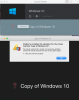
Can't remove virtual machine from control center.

doctorjay

Junior Member
Please see the attached screen shot. i can't remove this copy of my windows 10 vm that no longer exists. The windows 10 vm is my usual machine and runs just fine.
Can you help? why is remove greyed out. i uninstalled Parallels 12 and reinstalled with no change to the control center problem
Thanks for the help. Screen Shot 2017-08-12 at Aug 12   11.01.07 PM.png
 
it was on an external drive the i no longer have. the functioning windows 10 PVM is on my internal mac drive. I have another copy of windows 10 on a new external drive.
thanks
 
it was on an external drive the i no longer have. the functioning windows 10 PVM is on my internal mac drive.
Please quit Parallels Desktop completely. If there are any external storage devices connected to your Mac, eject and remove them. Then, launch Terminal application (Finder -> Go -> Utilities -> Terminal) and execute the following commands separately one by one (this will remove Parallels Desktop completely along with all of its traces):
---------------------------------------------------------------------------------------------------------
sudo su

NOTE: You will be prompted to enter your Mac password after executing the first command. Due to security measures you won't be able to see the password itself, just type it in and hit return/Enter.

rm -rfd /System/Library/Extensions/prl*

rm -rfd ~/Library/Preferences/com.parallels*

rm -rfd ~/Library/Preferences/parallels

rm -rfd ~/Library/Parallels

rm -rfd ~/Library/Saved\ Application\ State/com.parallels.desktop.console.savedState

rm -rfd /Library/logs/parallels.log

rm -rfd /Library/Preferences/Parallels/

rm -rfd /private/var/db/Parallels/

rm -rfd /private/var/.parallels_swap

rm -rfd /private/var/db/receipts/'com.parallels*'

rm -rfd /private/var/db/Parallels/Stats

rm -rfd /private/var/root/library/preferences/com.parallels.desktop.plist

rm -rfd ~/Applications\ \(Parallels\)/

rm -rfd /Applications/Parallels\ Desktop.app/

exit
---------------------------------------------------------------------------------------------------------
Close Terminal. Then, please launch Disk Utility (Finder -> Go -> Utilities -> Disk Utility) and run 'First Aid'. Once it finishes, reboot the Mac, reinstall Parallels Desktop and check for the issue.
 
Last edited:
I agree there should a script or utility to remove an old VM from Control Center. I am using PD 10 on High Sierra and I install a blank Windows 7 installation and I have an old VM called Windows 7 that appears in Control Center. I have already deleted Windows 7.pvm but still appears in Control Center.
 
I agree there should a script or utility to remove an old VM from Control Center. I am using PD 10 on High Sierra and I install a blank Windows 7 installation and I have an old VM called Windows 7 that appears in Control Center. I have already deleted Windows 7.pvm but still appears in Control Center.
Parallels Desktop 10 is an end of life product and it is not compatible with High Sierra. Instead of deleting the PVM file directly, you can right-click the VM in Parallels Desktop Control Center and remove it. Also, it is not easy to create a script for deleting the PVM file as a VM can be saved on different location based on the user selection during VM creation, unlike Parallels Desktop installation which will be saved on certain locations.
 
Hi,
I've a much simpler solution. Delete the saved state of your previous OS'es.:

rm -rfd ~/Library/Saved\ Application\ State/com.parallels.desktop.console.savedState

Close Parallels, re-open it, then you will be able to remove the older instances with the right-click of your mouse. Voila.
 
Hi,
I've a much simpler solution. Delete the saved state of your previous OS'es.:

rm -rfd ~/Library/Saved\ Application\ State/com.parallels.desktop.console.savedState

Close Parallels, re-open it, then you will be able to remove the older instances with the right-click of your mouse. Voila.
Hi, we appreciate your response.
 
Back
Top