
Hi there,
I'm trying to set up a Windows 10 VM, and I'm running into some issues. I have the .iso for 32-bit and 64-bit, and I had installed and run the 32-bit version just fine yesterday, but I realized the programs I needed to run would require a 64-bit version of Windows. I thought this wouldn't be a huge deal, so I got rid of the 32-bit VM, and tried to install the 64-bit version the same way.
The issue began when Parallels would only recognize the Win10_1607_English_x32.iso, and not the Win10_1607_English_x64.iso . I tried locating it manually, but it tells me "Unable to detect operating system." So, here's what else I've tried:
1) "Install Windows or another OS from a DVD or image file"
2) "Locate Manually"
3) "Continue without a source"
4) "Continue" > "Please select your operating system" (I select Windows 10) > "OK"
5) "I will primarily use Windows for" (I select Productivity) > "Continue"
6) On the next screen, I name the VM "Windows 10" and uncheck all three checkboxes: "Share with other users of this Mac," "Create alias on Mac desktop," and "Customize settings before installation"
7) A command prompt opens up, and concludes after several seconds that "No boot device is available, press Enter to continue."
8) I click the DVD icon on the top right, select "Connect image..." and then choose my Win10_1607_English_x64.iso file, which I downloaded directly from Microsoft, and do have a product key for, though I haven't gotten to a point where it asks me about that yet.
9) I hit Enter now, and with the Image loaded, I finally get somewhere. Windows tries to set up. HOWEVER, once I select the language and click setup, I am stuck at a dead end with no solution in sight. I'm informed that I'm missing installation media, and I can't figure out what to do. The attached screenshot illustrates what I'm seeing in this step.
Any insight would be so very appreciated. I'm at my wits end with this. I really like Parallels and I feel like I'm just missing some insight here. To clarify, the 32-bit version set up just fine, and was running in just a few minutes.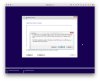
I'm trying to set up a Windows 10 VM, and I'm running into some issues. I have the .iso for 32-bit and 64-bit, and I had installed and run the 32-bit version just fine yesterday, but I realized the programs I needed to run would require a 64-bit version of Windows. I thought this wouldn't be a huge deal, so I got rid of the 32-bit VM, and tried to install the 64-bit version the same way.
The issue began when Parallels would only recognize the Win10_1607_English_x32.iso, and not the Win10_1607_English_x64.iso . I tried locating it manually, but it tells me "Unable to detect operating system." So, here's what else I've tried:
1) "Install Windows or another OS from a DVD or image file"
2) "Locate Manually"
3) "Continue without a source"
4) "Continue" > "Please select your operating system" (I select Windows 10) > "OK"
5) "I will primarily use Windows for" (I select Productivity) > "Continue"
6) On the next screen, I name the VM "Windows 10" and uncheck all three checkboxes: "Share with other users of this Mac," "Create alias on Mac desktop," and "Customize settings before installation"
7) A command prompt opens up, and concludes after several seconds that "No boot device is available, press Enter to continue."
8) I click the DVD icon on the top right, select "Connect image..." and then choose my Win10_1607_English_x64.iso file, which I downloaded directly from Microsoft, and do have a product key for, though I haven't gotten to a point where it asks me about that yet.
9) I hit Enter now, and with the Image loaded, I finally get somewhere. Windows tries to set up. HOWEVER, once I select the language and click setup, I am stuck at a dead end with no solution in sight. I'm informed that I'm missing installation media, and I can't figure out what to do. The attached screenshot illustrates what I'm seeing in this step.
Any insight would be so very appreciated. I'm at my wits end with this. I really like Parallels and I feel like I'm just missing some insight here. To clarify, the 32-bit version set up just fine, and was running in just a few minutes.