Duplic8tor
Bit poster
Hi, I can't share my MAC user folders with Windows AND cannot map MAC volumes to Windows.
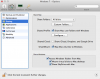
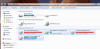
I am running MAC OS X 10.9.1 Mavericks and Parallels 9 Desktop 9.0.24172. I have Windows 7 installed vai Boot Camp partition, then running from MAC OS X. I have the correct boxes checked and have used PD for several years since v6.0. I've attached a screen shot of my settings and a screen shot of my Windows Explorer not showing my MAC drives or user folders. I've had no problems previously, but reinstalled both the MAC OS Mavericks and Windows 7 this past weekend. I've used this software for many years and have never experienced this problem. Any help is appreciated.
MacBook Pro 17
2.4GHz Intel Core i7
16 GB 1333 MHz DDR3
500 GB SSD
I am running MAC OS X 10.9.1 Mavericks and Parallels 9 Desktop 9.0.24172. I have Windows 7 installed vai Boot Camp partition, then running from MAC OS X. I have the correct boxes checked and have used PD for several years since v6.0. I've attached a screen shot of my settings and a screen shot of my Windows Explorer not showing my MAC drives or user folders. I've had no problems previously, but reinstalled both the MAC OS Mavericks and Windows 7 this past weekend. I've used this software for many years and have never experienced this problem. Any help is appreciated.
MacBook Pro 17
2.4GHz Intel Core i7
16 GB 1333 MHz DDR3
500 GB SSD
Attachments
Last edited: