I just put a tweet on Parallels support. I'm using toolbox 1.3.1 (638) on a 27" Late 2015 iMac (OS 0.12.3). The "capture area" feature hangs about 1/2 the time I try to use it. Makes me hesitant to go to the Toolbox.
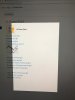
I will select the toolbox option, then select the area on my screen. The pointer turns into a camera icon and then when I click the selected area...nothing happens. The camera turns into the mouse pointer, menu selections can be clicked on but disappear after 1 second, and I'm stuck with a screen like what I have in my attachment. I'm forced to restart my computer.
My main question is can I force quit the app without restarting my computer?
I will select the toolbox option, then select the area on my screen. The pointer turns into a camera icon and then when I click the selected area...nothing happens. The camera turns into the mouse pointer, menu selections can be clicked on but disappear after 1 second, and I'm stuck with a screen like what I have in my attachment. I'm forced to restart my computer.
My main question is can I force quit the app without restarting my computer?