MacBook Pro 15 (2016)
macOS Sierra 10.12.4
ParallelsDesktop-12.2.0-41591
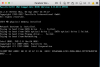
I got a ChkDsk error and the Virtual machine hangs. Subsequent attempts to boot windows 7 would also hang. I upgraded to 41591 with no change.
I uninstalled everything and attempted to re-install Parallels and a Windows 7 Virtual Machine. Now I get "No boot device is available" and I can not get passed that. I am unable to Shutdown the Virtual Machine per http://kb.parallels.com/en/123150 thread.
I'm behind the 8 ball. Anyone have any ideas?
macOS Sierra 10.12.4
ParallelsDesktop-12.2.0-41591
I got a ChkDsk error and the Virtual machine hangs. Subsequent attempts to boot windows 7 would also hang. I upgraded to 41591 with no change.
I uninstalled everything and attempted to re-install Parallels and a Windows 7 Virtual Machine. Now I get "No boot device is available" and I can not get passed that. I am unable to Shutdown the Virtual Machine per http://kb.parallels.com/en/123150 thread.
I'm behind the 8 ball. Anyone have any ideas?
Last edited: