
I first noticed this issue immediately after updating to parallels desktop 27.0.1 (58760)
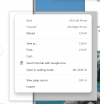
When using chrome in coherence mode, there is a bug with any popup menu where there is additional transparent padding around the submenu and that has a thin border around it. In the screenshot below I right clicked the chrome window when it is in coherence mode.
When the popup menu is rendering above just the desktop of the macos host, the background is slightly darker. (you can see that in the first screenshot)
When the popup menu is rendering on top of another window (whether it's another window from a program running in the windows 11 vm or a window from a program running on the macos host), the padding / border thing is transparent. (You can see this in the second screenshot. I am right clicking a parallels chrome page near the right side so some of it opens hanging outside of it's parent window, and right next to the chrome window I am right clicking I have another parallels chrome window directly adjacent to it. But the result is the same whether its macos chrome, or macos outlook, or any other window i tried).

When using chrome in coherence mode, there is a bug with any popup menu where there is additional transparent padding around the submenu and that has a thin border around it. In the screenshot below I right clicked the chrome window when it is in coherence mode.
When the popup menu is rendering above just the desktop of the macos host, the background is slightly darker. (you can see that in the first screenshot)
When the popup menu is rendering on top of another window (whether it's another window from a program running in the windows 11 vm or a window from a program running on the macos host), the padding / border thing is transparent. (You can see this in the second screenshot. I am right clicking a parallels chrome page near the right side so some of it opens hanging outside of it's parent window, and right next to the chrome window I am right clicking I have another parallels chrome window directly adjacent to it. But the result is the same whether its macos chrome, or macos outlook, or any other window i tried).