Click allow next to "Parallels International GmbH"

LisaB5

Bit poster
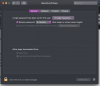
When I launch Parallels I receive this message: Click allow next to "Parallels International GmbH" But when I go to settings I do not see that as an option. (see attached screenshot) I am running macOS Mojave Version 10.14.6

I have tried the suggestions here and they did not help: https://kb.parallels.com/124244

Any other ideas? I have been using parallels for years every day and suddenly on Friday I received this message.
Thanks,
Lisa
 

Attachments

  • Screen Shot 2020-06-13 at 5.18.13 PM.png
    Screen Shot 2020-06-13 at 5.18.13 PM.png
    288.3 KB · Views: 6
When I launch Parallels I receive this message: Click allow next to "Parallels International GmbH" But when I go to settings I do not see that as an option. (see attached screenshot) I am running macOS Mojave Version 10.14.6

I have tried the suggestions here and they did not help: https://kb.parallels.com/124244

Any other ideas? I have been using parallels for years every day and suddenly on Friday I received this message.
Thanks,
Lisa
1) Reboot in recovery mode using Command+R combination (for more information refer to https://support.apple.com/en-us/HT201314).
2) In the terminal window type : spctl kext-consent add 4C6364ACXT
3) Enable it by typing: spctl kext-consent enable
4) Verify it by typing: spctl kext-consent list
5) Run First Aid under Disk Utility.
6) Reboot the Mac.
7) Install Parallels Desktop.
 
Back
Top