I have installed Windows 10 using the Parallels Wizard. I'm able to access my virtual machine and my desktop files are available. It seems like the installation is complete, however when I attempt to close the parallels wizard a pop up appears stating "Do you want to stop or suspend the installation?". If I click stop all progress will be lost. Several hours have past and it doesn't seem like anymore tasks are being completed. How do I know if installation is complete and if it is safe to close the wizard? Thanks

Install the app
How to install the app on iOS
Follow along with the video below to see how to install our site as a web app on your home screen.
Note: This feature may not be available in some browsers.
You are using an out of date browser. It may not display this or other websites correctly.
You should upgrade or use an alternative browser.
You should upgrade or use an alternative browser.
Closing Parallels Wizard after Installation of Windows 10
- Thread starter BoydC
- Start date
Hi @BoydC, please check if the virtual machine is in Coherence mode, refer to this KB article.
Hi Druba, I went to the article you referenced and it indicated I need to
- Right-click the Windows Start menu icon in Dock.
- Select View > Exit Coherence.

Ram@Parallels
Parallels Support
Hi BoydC, could you please provide us a screenshot, so that we can understand the issue better.
Hi Ram,
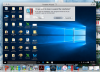
Please see below. This window has remained open for days now after installation. When I click to close the warning window shown appears. It seems to indicate installation is not yet complete? What do I do to complete the installation?
Also, after following Bdruda's previous instruction I discovered the windows start menu icon is not in my dock - this leads me to ask, should it be?
Please see below. This window has remained open for days now after installation. When I click to close the warning window shown appears. It seems to indicate installation is not yet complete? What do I do to complete the installation?
Also, after following Bdruda's previous instruction I discovered the windows start menu icon is not in my dock - this leads me to ask, should it be?
Attachments

BoydC, Did you receive an answer on this issue or were you able to figure it out? If so would love to hear what you found.Still waiting for help???

Hello, please be informed that Parallels Desktop 12 Update 12.1.3 (41532) was released and the issue has been addressed. Please update Parallels Desktop to the latest build and let us know how it works.Maybe I should also add that the Parallels Desktop Control Center has had this "time wheel" over the desktop view for several days as well. Does this indicate something is still happening in the background or does it always do this?
Did you update Parallels Desktop to the latest build 12.1.3 (41532)?BoydC, Did you receive an answer on this issue or were you able to figure it out? If so would love to hear what you found.
Yes, this issue occurred with the initial install of Parallels Desktop using build 12.1.3 (41532). So it would appear the issue can still occur with this buildDid you update Parallels Desktop to the latest build 12.1.3 (41532)?
I ended up stopping the installation which lost my Windows installation and subsequent windows apps I had installed. After reinstalling things seem to be working
We see that the issue got resolved after reinstalling. If the issue persists, let us know.Yes, this issue occurred with the initial install of Parallels Desktop using build 12.1.3 (41532). So it would appear the issue can still occur with this build
I ended up stopping the installation which lost my Windows installation and subsequent windows apps I had installed. After reinstalling things seem to be working