
frame_of_mind
Bit poster
Hi everyone,
I submitted a ticket for this already, but I wanted to see if anyone else had this issue (and hopefully solved it).
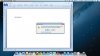
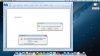
Basically, whenever I edit files (in Word or Excel) and I don't want to save the changes, two popups appear: (1) the normal one which asks if you want to save changes, and (2) a second one which says that I cannot quit Word because a dialog box is open.
How do I stop the second popup from appearing? It's unnecessary and annoying. This didn't happen with Parallels 7.
I appreciate any assistance with this. Thank you.
Other details:
1. Running Windows 7 SP1 on Parallels 8.
2. Microsoft Office 2010.
3. This only happens in Coherence mode with Crystal Mode on and Aero turned off.
Screenshots:
I submitted a ticket for this already, but I wanted to see if anyone else had this issue (and hopefully solved it).
Basically, whenever I edit files (in Word or Excel) and I don't want to save the changes, two popups appear: (1) the normal one which asks if you want to save changes, and (2) a second one which says that I cannot quit Word because a dialog box is open.
How do I stop the second popup from appearing? It's unnecessary and annoying. This didn't happen with Parallels 7.
I appreciate any assistance with this. Thank you.
Other details:
1. Running Windows 7 SP1 on Parallels 8.
2. Microsoft Office 2010.
3. This only happens in Coherence mode with Crystal Mode on and Aero turned off.
Screenshots: