
Recently Parallels asked to be allowed to update itself, and I said yes. (Over the weekend? In the last week? Not going to logs.)
Today, the first time I need to use Parallels since the update, Coherence is broken. E.g. when I start FrameMaker (the main reason I use Parallels), my Windows 8 VM starts, but FrameMaker does not act like a normal-ish Mac Window: it only works inside the window for the virtual display.
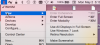
The menubar || > View > Enter Coherence menu item is grayed, as shown below.
---+ Config
Parallels Desktop 11 for Mac, Pro Edition, 11.2.0 (32581)

Windows 8.1 Pro(now, where do I find build number, etc?)
64-bit
OS-X Yosemite
10.10.5

Today, the first time I need to use Parallels since the update, Coherence is broken. E.g. when I start FrameMaker (the main reason I use Parallels), my Windows 8 VM starts, but FrameMaker does not act like a normal-ish Mac Window: it only works inside the window for the virtual display.
The menubar || > View > Enter Coherence menu item is grayed, as shown below.
---+ Config
Parallels Desktop 11 for Mac, Pro Edition, 11.2.0 (32581)
Windows 8.1 Pro(now, where do I find build number, etc?)
64-bit
OS-X Yosemite
10.10.5
