
At the start of the year, I installed the trial of Parallels 10 on my new Mac, but decided in the end to stick with Boot Camp as I didn't really need Windows running as a VM. However, despite having followed all of the instructions provided on the Parallels website (here) and having searched the forums for additional information, I'm still having trouble removing all traces of the program from Windows 7. The main issue is that when I choose the "Open with" option when I right-click on a file in Windows, the list of suitable programs is dominated by those I have installed on OS X:
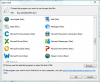
Obviously, this makes finding a suitable Windows program a bit tricky and I'd like to remove this from my Windows OS. Does anyone know how this is done?
Thank you in advance for any help!
Obviously, this makes finding a suitable Windows program a bit tricky and I'd like to remove this from my Windows OS. Does anyone know how this is done?
Thank you in advance for any help!
