Hello,
unfortunately I can't shrink or compress my virtual disk anymore.
It always says that there are only 0 MB to compress, which can't be true.
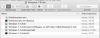
User/shared/Parallels/Windows 7.pvm --> content shows: 56 GB Windows 7-0.hdd
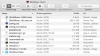
User/shared/Parallels/Windows 7.pvm/Windows 7-0.hdd --> content shows several files including:
- Windows 7-0.hdd with 0 Byte
- Windows 7-0.hdd.0.{5fbaabe3-6958-40ff-92a7-860e329aab41}.hds with 56 GB
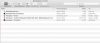
I think the Parallels compressor only finds the 0 Byte of the Win 7.hdd but not of the Win7.hdd.XXX.hds
I don't have any snapshots, so can't merge anything.
Strange is, that when I try to resize the virtual disk, an error occurs like: "disk is not readable"


My system: MacBook Air mid 2012, 1,8 GHz Intel Core i5, OS X El Capitain 10.11.4, Parallels 11.1.2 (32408)
Would be glad if anyone could help me... can't even save any word documents due to insufficient space.
Jessica
PS: Sorry, the screenshots are in german, but I guess you will know what I mean with them.
unfortunately I can't shrink or compress my virtual disk anymore.
It always says that there are only 0 MB to compress, which can't be true.
User/shared/Parallels/Windows 7.pvm --> content shows: 56 GB Windows 7-0.hdd
User/shared/Parallels/Windows 7.pvm/Windows 7-0.hdd --> content shows several files including:
- Windows 7-0.hdd with 0 Byte
- Windows 7-0.hdd.0.{5fbaabe3-6958-40ff-92a7-860e329aab41}.hds with 56 GB
I think the Parallels compressor only finds the 0 Byte of the Win 7.hdd but not of the Win7.hdd.XXX.hds
I don't have any snapshots, so can't merge anything.
Strange is, that when I try to resize the virtual disk, an error occurs like: "disk is not readable"
My system: MacBook Air mid 2012, 1,8 GHz Intel Core i5, OS X El Capitain 10.11.4, Parallels 11.1.2 (32408)
Would be glad if anyone could help me... can't even save any word documents due to insufficient space.
Jessica
PS: Sorry, the screenshots are in german, but I guess you will know what I mean with them.