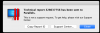
I've upgraded to Parallels 15, running windows 10. I am using an iMac 2017, running Catalina 10.15.1. When I open my VM it gives me an error message window "You need to restart this virtual machine", this is required to apple the changes made during the latest Parallels Tool Update". I restart and get the same message. Any ideas?

Install the app
How to install the app on iOS
Follow along with the video below to see how to install our site as a web app on your home screen.
Note: This feature may not be available in some browsers.
You are using an out of date browser. It may not display this or other websites correctly.
You should upgrade or use an alternative browser.
You should upgrade or use an alternative browser.
Constant Error Window to Restart Virtual Machine
- Thread starter kevinw
- Start date

Maria@Parallels
Problem solver
Please try to reset your VM and check the issue.I've upgraded to Parallels 15, running windows 10. I am using an iMac 2017, running Catalina 10.15.1. When I open my VM it gives me an error message window "You need to restart this virtual machine", this is required to apple the changes made during the latest Parallels Tool Update". I restart and get the same message. Any ideas?
Maria@Parallels
Problem solver
When does this issue appear at first time? After upgrade?
Yes after the last upgradeWhen does this issue appear at first time? After upgrade?
Maria@Parallels
Problem solver
Could you also please try to take a snapshot, then stop your VM and then start again.Yes after the last upgrade
Maria@Parallels
Problem solver
We've received your screenshot, will check your tech report and get back to you soon.Yes after the last upgrade
So I've kinda been left just hanging? No replies?We've received your screenshot, will check your tech report and get back to you soon.
Maria@Parallels
Problem solver
Sorry for the delay in response, we didn't find any critical error at your report.So I've kinda been left just hanging? No replies?
Could you please stop your VM, create a new empty VM and add hard drive from your 1st VM to the new one?
Also is it possible to click on Actions-> and choose reinstall Parallels Tools?
Maria@Parallels
Problem solver
Hello, we've got your report 346915380I am sorry. I must dumb as I can't get this to work. "Create new Empty VM" When I go to my Parallels folder the HDD shown is ending 0 but the one it runs ends in 1. And it never shows a second disk under HARDWARE in Configuration.
But could you please describe the issue in more details? Did you create an empty VM and cannot add second hard drive?
Please correct me if I'm wrong.