Converting to plain virtual hard disk - Parallels 6 for Mac

gkolar

Bit poster
In the user guide on pg 204 is says, "If the format of the virtual hard disk is expanding, you can convert it to plain by clearing the Expanding disk option."

Expanding isn't working for me as the VHD was 35 GB oversized (because of "Expanding"). Expanding disk is greyed out and can not be deselected, unlike what the manual says.

Any suggestions on how to make this change?
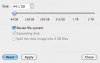
 

Attachments

  • Screen shot 2012-02-05 at 7.31.12 AM.png
    Screen shot 2012-02-05 at 7.31.12 AM.png
    35 KB · Views: 5
I suppose your virtual machin has been transferred from VM ware. If it is true there may be some difficulties managing the hard drive configuration.
I suggest you to check the current extension of your virtual hard drive - locate your virtual machine pvm file in Finder, right-click it and check the presence of .hdd file.
 
I suppose your virtual machin has been transferred from VM ware. If it is true there may be some difficulties managing the hard drive configuration.
I suggest you to check the current extension of your virtual hard drive - locate your virtual machine pvm file in Finder, right-click it and check the presence of .hdd file.

It isn't from VM ware. I don't own/use VMware. I started with Parallels v5 and upgraded to v6. Spotlight didn't find a file with "hdd."
 
That's why i asked you to find pvm file first - Spotlight is not able to find hdd file cause it is inside pvm bundle.
( btw VHD is the VMware file extension). anyway i suggest you to run chkdsk /f in your VM and try it again
 
That's why i asked you to find pvm file first - Spotlight is not able to find hdd file cause it is inside pvm bundle.
( btw VHD is the VMware file extension). anyway i suggest you to run chkdsk /f in your VM and try it again

How?

When I open the package contents (not something I've done much), there is Windows XP.hdd.
 
Completed. It didn't seem to find any errors, but I didn't see a log if there was one. After restart the option to deselect expanding disk was still greyed out.
 
Back
Top