
Install the app
How to install the app on iOS
Follow along with the video below to see how to install our site as a web app on your home screen.
Note: This feature may not be available in some browsers.
You are using an out of date browser. It may not display this or other websites correctly.
You should upgrade or use an alternative browser.
You should upgrade or use an alternative browser.
CPU temp not working on new M2 Macs
- Thread starter Don Awalt
- Start date
Tommy Lentsch
Bit poster
Same for me just got a 14" M2 Pro Max MacBook...was looking forward to watching fan rpm to see if I can use this in my Vocal Booth.I have an Apple M2 Pro Max MacBook Pro and the CPU Temp reported is 44 degrees Fahrenheit. This should probably be fixed lol.

Aydaskhan Asochakov
Parallels Support
Hello Don,I have an Apple M2 Pro Max MacBook Pro and the CPU Temp reported is 44 degrees Fahrenheit. This should probably be fixed lol.
Thank you for contacting Parallels Support.
To try to resolve your issue, kindly do the following below:
Find Parallels Toolbox in the top menu of Mac > Find CPU Temperature > Start the tool > Go to Preferences > Temperature > Pick Fahrenheit.
Check if the issue still persists.
If so, collect a technical report as per this article: https://kb.parallels.com/en/124107
Then copy 9-digit ID of the report and provide it in a reply message with screenshot of the issue (when Fahrenheit selected, but still shows as Celsius) .
Let us know if it helped you.
Aydaskhan Asochakov
Parallels Support
Greetings Tommy,Same for me just got a 14" M2 Pro Max MacBook...was looking forward to watching fan rpm to see if I can use this in my Vocal Booth.
Thank you for contacting Parallels Support.
To try to resolve your issue, kindly do the following below:
Find Parallels Toolbox in the top menu of Mac > Find CPU Temperature > Start the tool > Go to Preferences > Temperature > Pick Fahrenheit.
Check if the issue still persists.
If so, collect a technical report as per this article: https://kb.parallels.com/en/124107
Then copy 9-digit ID of the report and provide it in a reply message with screenshot of the issue (when Fahrenheit selected, but still shows as Celsius) .
Let us know if it helped you.
Tommy Lentsch
Bit poster


Don Awalt
Hunter
You misunderstand the issue. It's not reporting celsius as fahrenheit. If the preference is F, it shows the CPU temp as 44 degrees, GPU temp as 32 degrees - that's freezing! If I change the preference to celsius, the CPU temp is 6 degrees, GPU is 0 degrees. These are both totally inaccurate, the CPU and GPU are not near freezing temps.
I did run technical report and submitted it, the report number is 417614601.
I did run technical report and submitted it, the report number is 417614601.
Aydaskhan Asochakov
Parallels Support
Greetings Tommy,Here is the technical ID number 417612907
I had already changed it to Fahrenheit I've included an extra screenshot of the temp.
Thank you for the information provided.
Our Development Team is aware of this issue.
They are working on the solution.
Once we have an update, we will let you know.

Mikhail Ushakov
Problem solver
Hello,
Parallels Toolbox 6.0.2 has just been released where the issue with CPU/GPU temperature tool has been fixed.
Parallels Toolbox 6.0.2 has just been released where the issue with CPU/GPU temperature tool has been fixed.
Aydaskhan Asochakov
Parallels Support
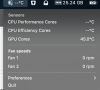
On M2 Max 14 inch Mac - still doesn't work. Sometimes shows GPU temp but quickly disappear.
Greetings Goran2,
Please be advised that if you seeing "--" instead of numbers - it's a known issue and it's under investigation.
More information could be found here - https://kb.parallels.com/en/129572
If you still having some issues, please collect a technical report as per this article: https://kb.parallels.com/en/124107
Then copy 9-digit ID of the report in a reply message.
Should you have any additional questions, let us know.
Have a great week ahead!
Aydaskhan Asochakov
Parallels Support
Greetings GaryB-85,Hello,
with Toolbox Version 6.0.2 the CPU-Temperature shows "--" degrees Celsius for the CPU and around 32 degrees Celsius for the GPU-Core (MacMini / M2-Pro).
Please be advised that if you seeing "--" instead of numbers - it's a known issue and it's under investigation.
More information could be found here - https://kb.parallels.com/en/129572
If you still having some issues, please collect a technical report as per this article: https://kb.parallels.com/en/124107
Then copy 9-digit ID of the report in a reply message.
Should you have any additional questions, let us know.
Have a great week ahead!