
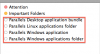
How do I get rid of the Tags in Finder for just the Parallels Desktop?
I really don't want or need them there, everything i've tried brings them back.
I've tried deleting them from the side menu and/or removing the tag from the More Info of each corresponding icon associated with it.
Nothing seems to be permanent, any help is appreciated .
.
Also if it helps I am using Parallels Desktop 9 for OS X 10.9.4 Mavericks.
I really don't want or need them there, everything i've tried brings them back.
I've tried deleting them from the side menu and/or removing the tag from the More Info of each corresponding icon associated with it.
Nothing seems to be permanent, any help is appreciated
.Also if it helps I am using Parallels Desktop 9 for OS X 10.9.4 Mavericks.
