Ok - I finally got Parallels to recognise the Time Machine backup
now I am trying to restore from the backup
my Apps (27.14gb)
and only the Computer section (1.4mb)of the Computer & Network settings)
(see screen shot)
the restore runs
then it gives an error that there is not enough room
I have used Parallels control center to increase the size of the HD (once to 256gb & another to 500gb or so) but it still runs out of space
Storage Manager app shows Parallels VM's are still only 59.94gb of storage - so it seems the size of the disk is not increasing
Parallels Control Center
- Hardware> Hard Disk says "Disk Capacity 728gb"
- General says total size 57.48gb
screen shot
https://smarta.com.au/wp-content/uploads/2020/08/Screen-Shot-2020-08-06-at-3.08.58-pm.png
I then found this extra info re disk partitioning
https://kb.parallels.com/112119
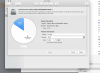
screen shot re partitioning is the attached image how it should look given that I want to give the VM about 500gb or so
now I am trying to restore from the backup
my Apps (27.14gb)
and only the Computer section (1.4mb)of the Computer & Network settings)
(see screen shot)
the restore runs
then it gives an error that there is not enough room
I have used Parallels control center to increase the size of the HD (once to 256gb & another to 500gb or so) but it still runs out of space
Storage Manager app shows Parallels VM's are still only 59.94gb of storage - so it seems the size of the disk is not increasing
Parallels Control Center
- Hardware> Hard Disk says "Disk Capacity 728gb"
- General says total size 57.48gb
screen shot
https://smarta.com.au/wp-content/uploads/2020/08/Screen-Shot-2020-08-06-at-3.08.58-pm.png
I then found this extra info re disk partitioning
https://kb.parallels.com/112119
screen shot re partitioning is the attached image how it should look given that I want to give the VM about 500gb or so