Dynamic Volume solution

Andrew Skoog

Junior Member
I know that transporter cannot move my Windows 2003 Server Mirrored Dynamic volume. Their directions says that I must copy the dynamic volume to a Mac basic disk. That's it, they say no more.

Any ideas how I copy this to a mac basic disk and any steps past that?

Thanks.....
 
Parallels Desktop 5. The question is deeper than it appears because I want to copy the entire operating system in place, not just data. This way I do not have to reinstall Windows Server 2003, Office, licensing, etc., etc., updates, etc., etc. I have already done a test transporter of a Windows XP system that was not dynamic to this Parallels Desktop install and was successful. Just can't do the Server dynamic install.
 
OS migration is very similar to data migration. So you can try to migrate your windows 2003 as data disk and then attach the resulting disk to new VM. Is Parallels Transporter able to migrate your windows 2003 host as data disk?
 
I guess I am dense or you are vague...or both. Are you saying rather than the Transporter Agent on the Windows side going over the network, I should migrate to an external USB storage? Then connect that USB storage to my macintosh and migrate from that? When I connect it to the mac, which choice do I then pick, new windows installation or import virtual machine? It seems like my USB disk would be neither.

If that is not it I have no idea what to do. I am sure I cannot do something as simple as Windows Explorer copy from c:\ to the external USB drive because that would not include the operating system, right? I would also assume I cannot use NTBAckup in any manner. On my version of Parallels Transporter Agent for Windows, there is only two options, Over Network and To external storage. I have Build 3.0.9200

I am kind of surprised this hasn't been addressed more fully. I would think that dynamic disks would be kind of common on the windows side, certainly on servers for the mirroring and expansion capabilities. I was surprised again when I had to delete my snow leopard server and reinstall to create a mirror, when, on Windows Server 2003 anyway, you just convert to dynamic and enable mirroring. Nothing deleted or reinstalled on the Windows side.
 
It's looks like miscommunication :(

You want migrate your windows 2003 computer to Parallels Virtual Machine.
To do this you can try Parallels Transporter. Parallels Transporter have some troubles with windows dynamic disks. Therefore it is impossible to migrate your computer to VM. But in some cases it must be possible to migrate the computer to Parallels virtual disk image (VM configuration file will not be created in this case). It doesn't matter you will use network or external storage migration.

Did you try to migrate your computer using Parallels Transporter?
 
Arghh.......Yes, I want to migrate my windows 2003 server to parallels. Please refer to question #1. I am actually one of those crazy customers that read the directions and searched the forums and tried to find an answer prior to posting this.

Transporter does not work. I get the error: "No active volume is selected or no operating system is installed on the specified volumes. The selected volumes will be migrated to Parallels virtual data disks. Are you sure you want to continue?" I hit continue and it asks for the name. I type in "Terminal Server" and I then get: "An error occurred while migrating the disk"

So.....it doesn't work, just like the directions said it wouldn't. What I am trying to figure out is how to do the cryptic direction's instructions of copying the dynamic volume to a macintosh basic disk, and then, I assume, importing that into Parallels.
 
... Transporter does not work. I get the error: "No active volume is selected or no operating system is installed on the specified volumes. The selected volumes will be migrated to Parallels virtual data disks. Are you sure you want to continue?" I hit continue and it asks for the name. I type in "Terminal Server" and I then get: "An error occurred while migrating the disk"
...
This is show me that something is wrong with Parallels Transporter.

I don't know your system configuration and therefore I need to know what actually is wrong with Parallels Transporter. Please, attach log files from Parallels Transporter (both client and agent log files are needed). I hope that I will be able to advise some solution after review log files.

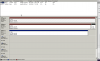
Also, please, attach a disk manager screenshot with disks configuration (Start -> Administrative tools -> Computer Manager -> Disk Management).

Thanks
 
Log file and screen shot info

I was unable to find the location of the log file on the macintosh side. I have attached the screen shot of the window's side disk management and the log file. I can attach the macintosh log file if you tell me where it is.

Thanks...
 

Attachments

  • Screen shot 2010-02-19 at 1.33.00 PM.png
    Screen shot 2010-02-19 at 1.33.00 PM.png
    40.7 KB · Views: 6
  • parallels.txt
    parallels.txt
    15.3 KB · Views: 3
On mac side log file's location is /Library/Logs/parallels.log

Thanks for log and screenshot. I will try to analyze it and I will search a solution.
 
upgraded to 9310

I upgraded the Windows Server to Transporter ver. 9310 and it did go further this time.

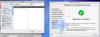
It warned me that there was no operating system in the selected volume. I hit continue anyway and 3 hours later it had it moved to the Macintosh. It said the migration was completed as a virtual hard disk. I started Parallels Desktop and tried to import as a virtual machine, but it is greyed out as a selection. I suspect that it copied the data, but is not bootable. I have enclosed the screen shot of the Transporter completion notice as well as the file open screen from Parallels Desktop.

I have also included the log file from the PC side.
 

Attachments

  • parallels.txt
    parallels.txt
    15.3 KB · Views: 1
  • Screen shot 2010-02-24 at 12.41.22 PM.png
    Screen shot 2010-02-24 at 12.41.22 PM.png
    175 KB · Views: 2
Data was migrated. ".hdd" is just virtual disk image. Now create new custom VM using migrated disk image(s) and try to boot it.

By the way, how many .hdd images was created during migration?

p.s. log files in posts #9 and #12 are same. Newest string are at the bottom part of log. You could pack the log file in archive to post here.
 
Last edited:
There was only one .hdd file created

I was able to mount the file and able to open word documents, etc inside of it.

I opened Parallels and did the following:
Create New Windows Installation->
Skid Detection ->
Windows 2003 Server ->
Custom ->
2 Processors
2048 gb Ram
Existing Image File->
\Documents\Parallels\terminal-server ->
ldmsrc.hdd
Bridged Networking ->
Ethernet Adapter ->
Optimize Performance Virtual Machine ->
Name Windows Server 2003 ->
Sharing - Redirect Windows user folder to Mac ->
Then asked for Windows 2003 DVD
I selected Boot Options ->
Choose and Image file
Selected the .hdd file again

When I try to start the Virtual Machine it pops up the screen cannot find SCSI boot device and then searches for IDE drives without ever starting up windows.
 
Try to boot from Windows installation CD in recovery console. In the recovery console type two commands:
fixboot
fixmbr

After that try to boot from hard disk image.
 
Back
Top