
I am trying to install El Capitan in a virtual machine on my mid 2012 MacBook Pro running High Sierra. I created an install disk using DiskMaker 6 from a download of the Install MacOS El Capitan installer from the App Store. It seems to go through all the steps until the last restart when I get a message that says:
Mac OS X could not be installed on your computer
No packages were eligible for install. Contact the software manufacture for assistance.
Quite the installer to restart your computer and try again.
I tried restarting several times and got the same message each time.
Does anyone know what I am doing wrong or what I need to do to get El Capitan to install?
Thank you for any help.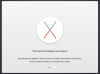
Mac OS X could not be installed on your computer
No packages were eligible for install. Contact the software manufacture for assistance.
Quite the installer to restart your computer and try again.
I tried restarting several times and got the same message each time.
Does anyone know what I am doing wrong or what I need to do to get El Capitan to install?
Thank you for any help.