Error launching parallels

sanremoave

Bit poster
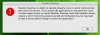
After upgrading to Leopard, I installed parallels and was able to use it effectively to launch my bootcamp partition. Sometime later I installed some upgrades and even had to install some older iphoto software from Tiger. Now, I'm unable to launch parallels. Attached is a screenshot of the error message. I attempted to reinstall the software but I am unable to do so --it asks for an application to run the launcher (?) and when I attempt to uninstall, I get a message that parallels is not installed, even tho I can still see the folders and files from my load before.

Any ideas on how I can get this working again? Thanks in advance.
 

Attachments

  • Picture 1.jpg
    Picture 1.jpg
    24.9 KB · Views: 8
What is build version?
and what are the crash messages

* Archive of /Library/Parallels/bugreports/ (right click on folder --> Create Archive)
or ~/Library/Parallels/bugreports/

* /Library/Logs/panic.log
or ~/Library/Logs/CrashReporter/Parallels.crash.log from the Mac side;
 
Is this what you mean?

-------------------------------------------------------------------------------
Parallels Desktop 3.0 for Mac OS X version 3.0 Build 4128.0 from 2007-06-09
-------------------------------------------------------------------------------
Received SIGBUS: Bus error
Access to fault address: 0x1
unknown signal sender: 2
-------------------------------------------------------------------------------

Did not find the records you requested under library/logs. No crashreporter or panic.log to choose from.
 
I have already tried that. In fact, the original installation I used was that one and when I attempt to uninstall as per the instructions in KB 4790 I receive a popup from the installer saying "you do not have parallels desktop installed on your computer". Should I continue with the steps anyway?
 
Is this problem?
SYMPTOMS
The following error message appears during the Parallels Desktop installation: 'There is nothing to install'.
CAUSE
Some files remains on the hard disk even after Parallels Desktop was removed and due to this fact Parallels Desktop installation fails.
RESOLUTION
1. Open Finder and go to Macintosh HD -> Library -> Receipts
2. Find "Install Parallels Desktop.pkg" file and delete it.
 
Did not find that file under library/receipts.

If I try to do an "install parallels desktop" I receive a message "There is no default applications specified to open the document "Install Parallels Desktop""
 
I cannot find an "installer" in the applications area. I also looked under utilities. Where will I find "installer.app"?
 
Back
Top