Whenever I try to connect Parallels to my Bootcamp Partition, it does recognize it, but it gives this error message when attempting to boot:
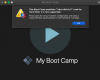
The Boot Camp partition "/dev/disk1s2" used by Hard Disk 1 is not supported.
I only have 1 Bootcamp Partition, which is the only drive that shows up in the Hard Disk drop-down menu. Any help?
The Boot Camp partition "/dev/disk1s2" used by Hard Disk 1 is not supported.
I only have 1 Bootcamp Partition, which is the only drive that shows up in the Hard Disk drop-down menu. Any help?