
Install the app
How to install the app on iOS
Follow along with the video below to see how to install our site as a web app on your home screen.
Note: This feature may not be available in some browsers.
You are using an out of date browser. It may not display this or other websites correctly.
You should upgrade or use an alternative browser.
You should upgrade or use an alternative browser.
Error PRL_ERR_KEXT_LOADING when trying to start a vm
- Thread starter HW_1
- Start date
Best answer
Hello,
i upgraded my Version from 15 to 16. After the installation i tried to start a vm and then this message appears in title and description: PRL_ERR_KEXT_LOADING.
Someone knows how to solve this problem?
I also encountered this problem after upgrading to Big Sur and Parallels Desktop 16. Some of my vms can start while the others can't, with the same PRL_ERR_KEXT_LOADING error. Turned out for those which can't start, the option 'Hardware -> CPU & Memory -> Advanced Settings -> Hypervisor' was set to 'Parallels'. After changing those to 'Apple' these vms starts just fine.

Maria@Parallels
Problem solver
Hi, the issue is still under investigation.Any solution to this yet? I can't work! The error keeps popping up, and I can't use the solution here because in order to change the hypervisor I need to "resume the virtual machine". Which I can't do because of this error. So frustrating.
Could you provide us with the tech report collected right after the issue reproduced please?
Maria@Parallels
Problem solver
Hi, please keep your Parallels Desktop updated, we're working on the resolution with Engineering TeamI have the exact same problem.
Maria@Parallels
Problem solver
Thank you for the provided information, could you collect new tech report please?It is not fixed it the version i got as an update today.
Maria@Parallels
Problem solver
Hi, thanks a lot for the provided information. Parallels Engineering Team are currently working on the issue resolution. Once we get any updates we will let you know.373186114
I feel that, I had to find the path to the workaround myself as well.Any solution to this yet? I can't work! The error keeps popping up, and I can't use the solution here because in order to change the hypervisor I need to "resume the virtual machine". Which I can't do because of this error. So frustrating.
Didn't have the issue until today, so here's how I got to the workaround:
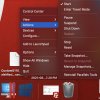
1) Go to the main screen on Mac's desktop, right-click on the instance of parallels you want to regain access to.
2) Go to Actions
3) Click "Stop"
4) Follow dialogue prompts until you've effectively forced the shutdown of your instance (sucks to lose progress on anything you're working on, but better than having no access at all)
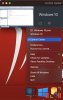
5) Right-click the main Parallels icon
6) Click "Control Center"
7) Click the gear icon next to the instance you want to regain access to.
8) Click the dropdown box under "CPU and Memory" labeled "Hypervisor" and select "Apple"
9) Click the lock at the bottom left to save changes
10) $$$
Maria@Parallels
Problem solver
Hello, the issue has been fixed in the newest Parallels desktop version.So are we still under investigation to this problem?
Why is it everytime, repeat every time I either update my Mac OS or update Parallels I run into errors, and typically this error?
PRL_ERR_KEXT_LOADING
Did you get the same error with Parallels Desktop 17?
Magdalena1
Bit poster
I have Parallels Desktop 16, bought it not long ago and I am not going to pay for another version. Could youl please provide a solution to solve this problem in PD 16Hello, the issue has been fixed in the newest Parallels desktop version.
Did you get the same error with Parallels Desktop 17?