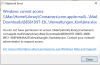
Error "

SandroL2

Junior Member
Hi there
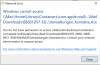
I receive the attached error whenever I try to open MS Office (Excel and PPT particularly) documents directly from Apple Mail program using Parallels Desktop VM. Any ideas as to how to troubleshoot this issue?

Much appreciated & Best!
 

Attachments

  • Screenshot 2020-07-13 at 10.48.29.png
    Screenshot 2020-07-13 at 10.48.29.png
    68.5 KB · Views: 5
  • Screenshot 2020-07-13 at 10.48.29.png
    Screenshot 2020-07-13 at 10.48.29.png
    68.5 KB · Views: 5
Hi Maria!
Many thanks for your support - I checked the proposed solution and my Desktop was indeed not under Mac/Home/Desktop, but I had moved to my iCloud. However please note that the file I am trying to open (where I get the error message) is not saved on my Desktop, but is saved under Home/Library/Containers/com.apple.mail... Many thanks!
 
Did you restart your VM after the Parallels Tools reinstallation?
Also please collect the tech report once the issue reproduced and post the report's ID here.
Yes, I did restart VM after the reinstallation.
As per your request, I just submitted the tech report 346292451 for your reference. Note that I produced the error and immediately afterwards generated the report, I hope that it worked - else please let me know...
 
Yes, I did restart VM after the reinstallation.
As per your request, I just submitted the tech report 346292451 for your reference. Note that I produced the error and immediately afterwards generated the report, I hope that it worked - else please let me know...
Did you get a chance to look at the tech report, @Maria@Parallels ? Thanks!
 
Hi, thank you for your patience.
One more question; did you check permissions of the MS Excel files? I mean do you have a full access?
As I open the files from Apple Mail program, I cannot get to the "Get info" menu of these particular files and check for permissions - however I checked in the temporary files/attachments folder in Finder and there the permissions looked fine. If I save the files to my computer the Error does disappear.
 
Back
Top