Excessive CPU usage on Kali Linux

DavidX2

Bit poster
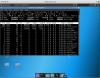
The CPU usage continuously exceed 200% when idling.

Parallels Tools: Installed
Guest OS: Linux 4.9.0-kali3-amd64 #1 SMP Debian 4.9.13-1kali3 (2017-03-13) x86_64 GNU/Linux
Host OS: macOS 10.12.3
Parallels: Version 12.1.3 (41532)
Hardware: Macbook Pro 15" Retina Mid 2015, 16G RAM, 1TB HDD, ATI M370X video card
 
Last edited:
I'm experiencing this exact issue, and a very large part of the reason I have a parallels licence to begin with was because I wanted the best performance for my Kali VM for penetration testing.

The big problem here is Xorg, I've tested this on fresh builds of both Kali standard and Kali light (disk images downloaded fresh within the past two weeks).

It's expected that before installing the tools, the system should be using software rendering and as such xorg should have a reasonable load, but after it should be able to avail of the virtualised graphics card.

In my case I'm seeing about 60-70% cpu consistently reported pre-parallels tools installation, and 160-180% after. Disabling compositing within XFCE in this case made no difference.
 

Attachments

  • Screen Shot 2017-03-23 at 10.29.33.png
    Screen Shot 2017-03-23 at 10.29.33.png
    576.1 KB · Views: 9
Last edited:
Just some more information in the hope it proves useful in resolving this:
lspci reports this for the graphics:

01:00.0 VGA compatible controller: Parallels, Inc. Accelerated Virtual Video Adapter (prog-if 00 [VGA controller])
Subsystem: Parallels, Inc. Accelerated Virtual Video Adapter
Flags: bus master, fast Back2Back, 66MHz, medium devsel, latency 0, IRQ 30
I/O ports at 6000
Memory at b0000000 (32-bit, prefetchable) [size=64M]

Expansion ROM at 000c0000 [disabled] [size=128K]
Capabilities: [40] MSI: Enable+ Count=1/1 Maskable- 64bit+
Kernel driver in use: prl_tg
Kernel modules: prl_tg

I'm working on getting various log files pulled over.
 
Last edited:
I've attached the various relevant log files. It's a tar.gz archive which I've zipped on mac, because this forum doesn't allow .tar.gz files.
 

Attachments

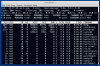
I am getting back to rkulikov with the top processes. It is Xorg process that consumes most of CPU.
A screenshot is attached.
 

Attachments

  • Screen Shot 2017-03-24 at 10.27.26 PM.png
    Screen Shot 2017-03-24 at 10.27.26 PM.png
    232.8 KB · Views: 2
I confirm the issue. Seems we have some troubles with Xorg 1.19 at the moment.
That's great you've been able to replicate the problem, is this now in some sort of internal queue to be resolved?

Also, have you or any of your colleagues any recommendations to get around this?

Given the frequency Kali has package updates, running an older version isin't too much of an option I'd imagine :(
 
> Also, have you or any of your colleagues any recommendations to get around this?
To workaround you may try to enable USB mouse for the guest: add devices.usb.mouse=2 to VM's boot args.
 
> Also, have you or any of your colleagues any recommendations to get around this?
To workaround you may try to enable USB mouse for the guest: add devices.usb.mouse=2 to VM's boot args.
Hi,
No joy with this i'm afraid, still getting crazy high xorg usage. I've resorted to running kali in multi-user mode and SSHing to it, i can at least get some things done with the non-graphical applications for now, though not having the graphical applications is a bit limiting.

Any other suggestions?

Edit: I retract the above. I thought by 'VM's boot args' you meant the kernel options, however I was curious what 'devices.usb.mouse=2' referred to, and found another conversation with instructions to edit the actual VM settings.

For anyone else wondering:
  1. Go into your virtual machines configuration (within Parallels).
  2. Go to 'Hardware'
  3. Go to 'Boot Order'
  4. Press 'Advanced Settings'
  5. Insert 'devices.usb.mouse=2' into the 'Boot Flags' box.
Your VM will need to be shut down for this to take effect.

rkulikov - Can you enlighten me as to what this actually does? Best I can tell from looking around it's something to do with device emulation, but I'm not seeing anything specific.
 
Last edited:
To make it clear. You need to add "devices.usb.mouse=2" to virtual machine boot arguments: VM configuration -> Hardware -> Boot Order -> Advanced Settings -> Boot flags. This should be not mixed up with kernel args in grub inside guest.
 
Hi There,
Can I get confirmation that this issue is being tracked and worked on within Parallels? Having the workaround in place does resolve the issue, which is great but I'd like to know that you guys are working on a built-in fix.

I'd also really like a description on what this workaround actually does, there isn't any documentation I can find that explains these arguments.
Mike
 
> I'd also really like a description on what this workaround actually does, there isn't any documentation I can find that explains these arguments.

By default current version of Parallels Desktop virtualises mouse in Linux-based guests as a PS/2 device. And this configuration doesn't work well with Xorg 1.19: xserver is busy processing flood of mouse events. Provided workaround forces Parallels Desktop virtual machine to pass mouse as a USB device to the guest. In a such case there's no issues with overgenerated mouse events.
 
> Also, have you or any of your colleagues any recommendations to get around this?
To workaround you may try to enable USB mouse for the guest: add devices.usb.mouse=2 to VM's boot args.

I was having the same problem, and added devices.usb.mouse=2 has definitely fixed it for me. Thanks!
 
Parallels Desktop 12.2.0 is out with the fix of this problem. Suggest to update. Don't forget to update Parallels Tools as well.
 
By default current version of Commonalities Desktop virtualises rabbit in Linux-based guests as a PS/2 device. And this settings does not work properly well with Xorg 1.19: xserver is busy handling overflow of rabbit events.
 
Back
Top