Apologies for the length of the post below, however I want to provide as much background as possible.
First, I used Boot Camp and partitioned my Mac with a 10gb section for Windows XP. Went through the entire Boot Camp setup and Windows setup processes and I had a working Boot Camp installation.
Then, I installed Parallels and setup a VM with the Boot Camp disk, at this point all is well. Later on, I started to run out of disk space so I decided I would move to a standard VM and dump the Boot Camp part.
Within the Boot Camp VM, I installed Transporter and created a new Standard VM from my Boot Camp VM and saved it onto my Z: drive (which is my home directory from XP).
So far so good.
After using the Standard VM for a few days, I felt confident that there were no problems so I dumped the Boot Camp partition and the corresponding Parallels VM.
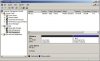
Space was still an issue so when I launched the Disk Management Adminstrative Tool, I saw there were two volumes listed, in this order (see attached disks.jpg):
1) Volume Unallocated space of 101 GB
2) Volume C: FAT32 space of 10 GB (the System volume)
What I would like to do now, is expand my C: drive to about 20 GB and continue about my business.
I tried using gparted but no dice on that front (though I tried a version which was known to be wonky, I am going to try 0.3.1.1 and update the post).
I'm concerned that gparted won't work because the unallocated space is **before** my C: drive.
Can I simply do the following:
- remove the unallocated space entirely using some tool or by compacting?
- use the Image Tool to expand my VM HD to 20 GB?
Any thoughts, insights, comments, etc are appreciated. I'm not in a major bind yet but the space issue is becoming annoying.
First, I used Boot Camp and partitioned my Mac with a 10gb section for Windows XP. Went through the entire Boot Camp setup and Windows setup processes and I had a working Boot Camp installation.
Then, I installed Parallels and setup a VM with the Boot Camp disk, at this point all is well. Later on, I started to run out of disk space so I decided I would move to a standard VM and dump the Boot Camp part.
Within the Boot Camp VM, I installed Transporter and created a new Standard VM from my Boot Camp VM and saved it onto my Z: drive (which is my home directory from XP).
So far so good.
After using the Standard VM for a few days, I felt confident that there were no problems so I dumped the Boot Camp partition and the corresponding Parallels VM.
Space was still an issue so when I launched the Disk Management Adminstrative Tool, I saw there were two volumes listed, in this order (see attached disks.jpg):
1) Volume Unallocated space of 101 GB
2) Volume C: FAT32 space of 10 GB (the System volume)
What I would like to do now, is expand my C: drive to about 20 GB and continue about my business.
I tried using gparted but no dice on that front (though I tried a version which was known to be wonky, I am going to try 0.3.1.1 and update the post).
I'm concerned that gparted won't work because the unallocated space is **before** my C: drive.
Can I simply do the following:
- remove the unallocated space entirely using some tool or by compacting?
- use the Image Tool to expand my VM HD to 20 GB?
Any thoughts, insights, comments, etc are appreciated. I'm not in a major bind yet but the space issue is becoming annoying.